How can AI be used in phishing attacks? An MSP guide
How can AI be used in phishing attacks? See the tactics MSPs should teach clients and the workflow that reduces damage.
DefendWise
DefendWise
TL;DR
AI is not creating a completely new class of phishing. It is making familiar phishing work cheaper, faster, cleaner, and more personal. Attackers can use it to write better lures, translate scams, mine public context, clone voices, create fake profiles, and rehearse convincing scripts.
For MSPs, the useful answer is not “tell clients to look for bad grammar.” That advice is worn out. Clients need a verification workflow for payments, account access, password resets, MFA prompts, payroll changes, and vendor requests. They also need fast reporting, identity controls, and tenant-ready evidence that staff have been trained on the new shape of the threat.
What is AI phishing?
AI phishing is phishing or social engineering where the attacker uses artificial intelligence to improve some part of the attack. The AI might write the message, clean up the grammar, translate the lure, personalize the content, create a voice clone, generate a fake video, summarize a target’s public profile, or coach the attacker during a live conversation.
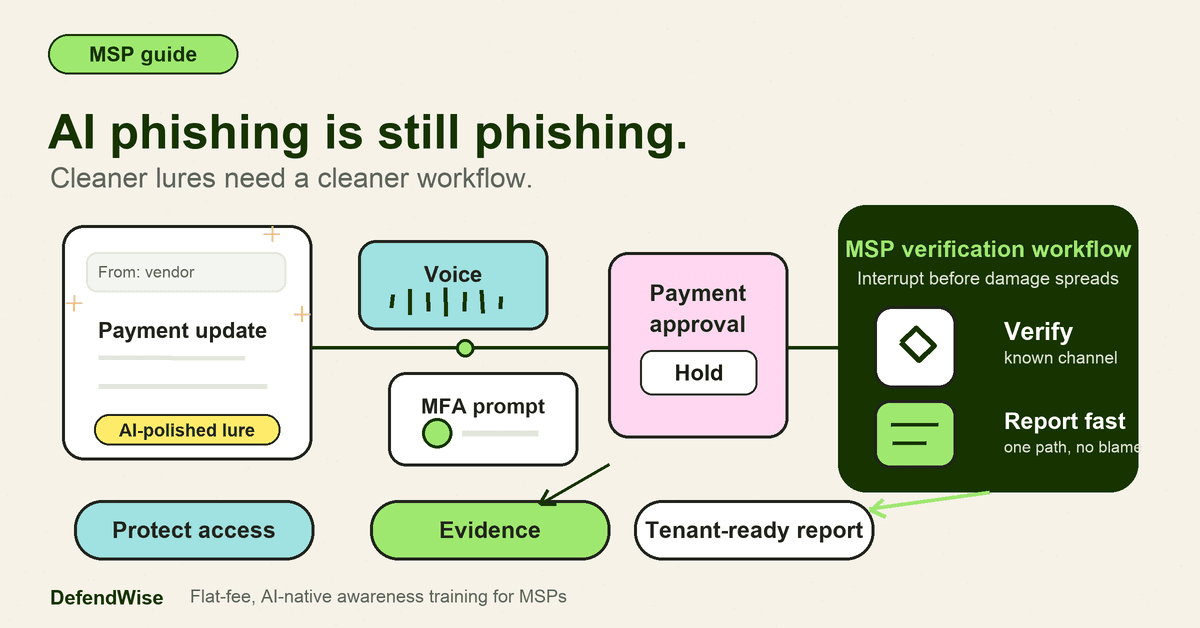
The important point for MSPs is that AI phishing is still phishing. The attacker is still trying to make a person do something unsafe: click a link, enter credentials, approve MFA, open an attachment, send money, change bank details, reveal a code, or trust the wrong person.
CISA’s phishing guidance describes phishing as social engineering that tricks someone into revealing information or taking an action that compromises systems or networks. The 2025 CISA, NSA, FBI, and MS-ISAC phishing guidance covers credential phishing, malware-based phishing, SMS, collaboration platforms, VoIP spoofing, weak MFA patterns, user training, and incident response. AI changes how convincing those lures can become. It does not remove the need for the basic controls.
A practical definition:
AI phishing is phishing where AI helps the attacker produce a more believable, more targeted, or more scalable deception.
That includes email, SMS, chat, voice, video, QR codes, fake portals, fake support conversations, and BEC-style requests.
Why this matters for MSPs
MSPs support clients that often have the same risk pattern: busy staff, small finance teams, shared vendor relationships, Microsoft 365 or Google Workspace, remote access, cloud apps, and limited time for security process. AI-assisted phishing hits that exact operating model.
The FBI’s IC3 2024 Annual Report recorded 859,532 complaints and $16.6 billion in reported losses. Phishing and spoofing were the most reported crime type in that report, and business email compromise drove about $2.77 billion in reported losses. The FBI’s 2026 press release on the 2025 IC3 report said cyber-enabled crimes caused nearly $21 billion in reported losses, with AI-related complaints included as a dedicated category for the first time.
Those figures are complaint data, not a complete map of every incident. But they show the same thing MSPs already see in tickets: social engineering turns normal business habits into money, access, and trust problems.
Microsoft’s 2025 Digital Defense Report makes the identity point clearly. Attackers increasingly “log in” instead of “break in,” and Microsoft recommends phishing-resistant MFA, workforce readiness, security culture, and AI-aware threat planning. Microsoft also says it screens billions of emails daily and observes AI as both a defensive tool and an attacker accelerator.
That is the MSP problem. A client does not only need to know that AI phishing exists. They need to know what to do at 4:47 p.m. when a clean email, a convincing voice note, and a Teams message all point to the same urgent request.
How attackers use AI in phishing attacks
AI helps at several stages of the phishing workflow. Some uses are simple. Some are more advanced. Most are a force multiplier for old tactics.
| AI use | What it changes | Example risk for an MSP client | Better client rule |
|---|---|---|---|
| Message writing | Cleaner grammar and more natural tone | A fake invoice email no longer looks “off” | Verify requests by context, not grammar |
| Personalization | Lures reference names, roles, projects, vendors, and events | A finance user receives a payment request that fits the client’s business | Verify payment changes through a known channel |
| Translation | Scams can be localized quickly | A branch office receives fluent-language phishing | Apply the same verification process in every region |
| Fake profiles | Attackers build believable personas | A fake recruiter, supplier, or IT support contact starts a conversation | Do not trust new contacts without independent verification |
| Voice cloning | A familiar voice can ask for money or access | “The owner” calls asking for a transfer or password reset | Voice is not proof; call back on a known number |
| Deepfake video | A fake meeting can create executive pressure | A leader appears to approve a sensitive transaction | Require written and out-of-band approval for risky actions |
| Fake portal copy | Login pages and support flows look more credible | Users enter Microsoft 365 or payroll credentials on a fake page | Use bookmarks, app launchers, and password managers |
| Live script coaching | Scammers respond better under questioning | A helpdesk user is talked through a reset or MFA approval | Helpdesk scripts must refuse codes and verify identity |
The lesson is not that every attacker is now a machine-learning expert. CrowdStrike’s 2025 writing on AI-powered social engineering is useful here: AI can make attacks more personalized and scalable, but organizations still need identity protection, anomaly detection, and continuous education. Group-IB makes a similar point: fully autonomous AI cybercrime is not the main story yet. Hybrid human-AI operations are already changing scams, phishing, deepfakes, and call-center fraud.
1. AI writes better phishing emails
Old phishing awareness advice leaned heavily on spelling mistakes, strange punctuation, and awkward phrasing. That advice is no longer enough.
A large language model can write a polished email in seconds. It can imitate a professional tone, remove errors, shorten a message, rewrite it for a finance user, or make it sound like a supplier. It can create 10 variants of the same lure so each recipient sees something slightly different.
That does not mean every polished email is malicious. It means “bad grammar” is a weak detection rule.
MSPs should teach clients to ask better questions:
- Was I expecting this request?
- Is the sender asking me to leave the normal workflow?
- Is there pressure to move fast?
- Is the request about credentials, MFA, money, payroll, bank details, or sensitive data?
- Can I verify this through a known channel?
A clean phishing email can still be wrong in context. Training needs to focus on context.
2. AI personalizes spear phishing faster
Spear phishing used to take more manual research. Attackers had to read public profiles, company pages, social posts, press releases, job ads, and vendor references. AI can speed up that research and turn it into a usable lure.
A prompt can summarize a target’s role. It can find likely reporting lines. It can generate a plausible vendor follow-up. It can draft messages for finance, HR, helpdesk, executives, or new starters.
For an MSP client, that changes the feel of the attack. Instead of a generic “urgent invoice” email, the message might reference a real project, a real supplier category, a real executive, or a real staff change.
That is why verification should be tied to the action, not the sender’s apparent familiarity.
Examples:
- Bank-detail changes require a callback on a known number.
- Payroll changes require a second approval.
- Password resets require the helpdesk identity workflow.
- MFA prompts are only approved when the user started the login.
- New vendor payment instructions do not move by email alone.
3. AI helps attackers scale multilingual lures
AI translation and rewriting tools make it easier for attackers to produce fluent messages in many languages. That matters for MSPs with clients that have remote workers, offshore teams, franchise sites, or multilingual staff.
The attack no longer needs to reveal itself through awkward translation. A scam can be localized well enough to pass a quick read.
This is another reason to avoid training that says “look for broken English.” It is outdated and risky. The safer rule is: if the request changes access, money, identity, or sensitive data, verify the request through the approved workflow.
4. AI can create voice-clone and vishing attacks
Voice has always carried false trust. A caller sounds confident. Caller ID looks familiar. The person knows enough about the business to feel legitimate.
AI makes that worse because it can help attackers create cloned voices or more natural call scripts. The FTC has warned consumers about harmful voice cloning, including scams where a cloned voice makes an urgent request for money or information. CrowdStrike also notes that attackers can use short audio and video samples to generate convincing impersonation content.
For MSP clients, the obvious risk areas are:
- finance transfers;
- supplier payment changes;
- payroll changes;
- account recovery;
- password reset approvals;
- remote access support;
- executive requests outside normal process.
Training should be blunt: voice is not proof. A familiar voice is not approval. A callback on a known number is better than trusting the call you received.
That rule should not live only in training. It should be in finance procedure, helpdesk scripts, payroll process, and executive assistant guidance.
5. AI can create deepfake video pressure
Deepfake video does not need to be perfect to be dangerous. It only needs to be believable enough in the moment, under pressure, in a context where people are trained to follow senior direction.
Group-IB describes live deepfakes as one of the more concerning AI impersonation developments because they can simulate legitimate people in real-time meetings. The widely reported Arup case, referenced by multiple security firms and news outlets, shows why this matters: a convincing executive impersonation can turn a meeting into a financial fraud path.
Do not overstate the point. Most SMB phishing incidents will still be simpler than a fully staged deepfake meeting. But MSPs should prepare clients for the category.
A useful client rule:
Any unusual financial, access, or payroll request needs the same approval workflow, even if it arrives by video.
Video can support a conversation. It should not replace verification.
6. AI makes fake support conversations more believable
Attackers often impersonate IT, Microsoft, a vendor, a bank, or a helpdesk. AI can help them write better scripts, respond to objections, and keep the conversation moving.
This matters because many successful phishing attacks happen after the first message. The user clicks, then chats. Or answers a call. Or receives a second message. Or gets walked through a fake reset.
Train the risky support moments:
- Real IT should not ask for your password.
- Real IT should not ask you to read out an MFA code.
- Real IT should not ask you to approve a login you did not start.
- Real IT should not move you to an unknown remote-support tool without process.
- If you feel pressured, stop and contact the helpdesk through the normal route.
MSPs should also train their own helpdesk teams. A user is not the only target. Helpdesk staff are natural targets for account recovery and access-reset scams.
What MSPs should teach clients now
The best AI phishing training is not a list of scary AI tricks. It is a short set of operating rules that survive better writing, better voices, and better impersonation.
Teach the 5 risky request types
Most client training can start with 5 categories:
- Login requests — unexpected links, QR codes, password resets, MFA prompts.
- Money requests — invoices, wire transfers, supplier bank changes, urgent purchases.
- Access requests — password resets, admin changes, new users, mailbox delegates.
- Data requests — payroll files, client lists, tax documents, credentials, reports.
- Process-bypass requests — “do this quickly,” “keep it quiet,” “I am in a meeting,” “use this new number.”
If an AI-generated message asks for one of those actions, the answer is not “decide if the email is real.” The answer is “use the verification workflow.”
Teach verification as a habit
Verification should be specific. “Be careful” does not help much.
Better rules:
- Call back using a known number, not the number in the message.
- Confirm bank-detail changes with an existing contact through an approved channel.
- Use the known login page, bookmark, app launcher, or password manager.
- Ask the helpdesk through the normal route if a reset request feels wrong.
- Require second approval for payroll, supplier, and payment changes.
- Pause on urgency. Pressure is part of the attack.
The FBI’s “Take a Beat” message is good language for client training. It tells people to pause before sending money or personal information under pressure. MSPs can make that operational: take a beat, verify, then act.
Teach fast, shame-free reporting
AI phishing gets worse when users hide mistakes. A user who entered a password or approved a prompt needs to report immediately. The MSP can then reset credentials, revoke sessions, check mailbox rules, review MFA changes, and warn other users if needed.
Make the reporting path simple:
- suspicious email or message;
- suspicious call or voicemail;
- suspicious QR code;
- credentials entered;
- MFA prompt approved;
- money or data request received;
- voice or video impersonation suspected.
Do not make the user guess whether it is “serious enough.” If it feels wrong, report it.
What MSPs need behind the training
Training is only useful if there is a workflow behind it. When someone reports a suspected AI phishing attempt, the MSP needs a playbook.
| Reported event | First MSP action | Follow-up evidence |
|---|---|---|
| Suspicious email or chat | Capture message, inspect links, warn affected users if needed | Ticket, message sample, verdict, client notice |
| Credentials entered | Reset password, revoke sessions, review sign-in logs | Timeline, account actions, log excerpts |
| MFA prompt approved | Review MFA method, sign-ins, registered devices, and session state | MFA review, exception note, remediation |
| Payment request received | Confirm whether process was followed; alert finance owner | Verification record, approval trail |
| Voice/deepfake suspicion | Preserve call details, confirm through known contact, review affected process | Incident note, caller details, process update |
| Fake IT/support contact | Check account recovery actions, remote tools, tickets, and helpdesk queue | Helpdesk review, user comms, control change |
That evidence matters because clients will ask what happened. Insurers, auditors, boards, and owners will ask what was trained, what was reported, and what changed after the incident.
What good looks like for an MSP client
A good client program does not depend on everyone spotting every fake. It assumes some fakes will look clean and some people will be busy.
Good looks like this:
- Staff know AI can remove old warning signs.
- Finance verifies payment and bank-detail changes outside email.
- Helpdesk staff refuse passwords and MFA codes.
- Executives agree that urgent requests still follow process.
- Users report quickly without fear of blame.
- High-risk users have stronger MFA where practical.
- The MSP can show training coverage by tenant.
- The MSP has a response checklist for credentials, mailboxes, payments, and impersonation.
The goal is not fear. The goal is friction in the right places.
Mistakes to avoid
Mistake 1: Teaching “bad grammar” as the main warning sign
Bad grammar can still be a signal, but it is no longer the foundation. AI can write clean emails, fluent translations, and polished scripts. Teach context, verification, and reporting.
Mistake 2: Treating AI phishing as an email-only problem
AI phishing can arrive through email, SMS, Teams, Slack, LinkedIn, phone, video, QR codes, fake portals, or support chats. Train the action being requested, not only the channel.
Mistake 3: Trusting voice or video as proof
Voice and video are useful. They are not final approval for money, access, payroll, or sensitive data. Keep the verification workflow even when the request feels personal.
Mistake 4: Training users but not finance and helpdesk workflows
Finance, payroll, executives, and helpdesk users face different pressure. Give them specific scripts and escalation paths. “Watch out for phishing” is too vague.
Mistake 5: Leaving no evidence trail
If the client asks who was trained on AI phishing, when they completed it, what was covered, and what exceptions remain, the MSP should not be rebuilding the answer from memory. Keep tenant-level evidence.
Framework mapping for client conversations
AI phishing awareness can support several client conversations, but use careful language. Training does not prove compliance by itself. It supports awareness, reporting, identity hygiene, and risk management evidence.
| Framework or conversation | How AI phishing training helps | Evidence to keep |
|---|---|---|
| NIST CSF awareness and identity conversations | Shows users were trained on social engineering, authentication risk, and reporting | Training topic, dates, completion, role groups |
| CISA phishing guidance | Aligns with user training, reporting, phishing-resistant MFA, and incident response themes | Training records, MFA roadmap, response checklist |
| Cyber insurance readiness | Shows practical controls around phishing, BEC, MFA, and incident reporting | Completion reports, finance verification procedure, incident notes |
| ISO 27001 awareness evidence | Supports awareness and process evidence without claiming full compliance | Scope, audience, dates, overdue users, exceptions |
| QBR reporting | Gives the MSP a concrete human-risk topic to report and improve | Coverage trend, risky roles, incidents, next actions |
The clean client message is: here is what staff were taught, here is how risky requests are verified, here is what we do when someone reports, and here are the exceptions we still need to close.
How a flat-rate MSP SAT platform helps
AI phishing topics change quickly. If every new topic requires another manual campaign build, MSPs will fall behind or ration training to a smaller group.
DefendWise gives MSPs a flat-rate, white-label, multi-tenant way to deliver security awareness across client users and report coverage by tenant. For AI phishing, that matters because the risk is not limited to executives. A receptionist, helpdesk user, finance clerk, manager, or owner can all become the path into a client environment.
If you want to cover AI phishing without turning every new scam pattern into another manual admin job, start with the 7-day free trial.
You can also connect this topic with existing client training on credential phishing, AI voice scams, social engineering scams, Outlook phishing reporting, and security awareness effectiveness.
Frequently asked questions
How can AI be used in phishing attacks?
AI can help attackers write cleaner emails, personalize lures, translate messages, summarize target information, generate fake profiles, clone voices, create deepfake video, and coach live social engineering scripts. It makes familiar phishing tactics faster and more believable.
Does AI make phishing harder to spot?
Yes. AI can remove old warning signs such as poor spelling, awkward grammar, and generic wording. That means users need to rely more on context, verification, and reporting paths.
What is generative AI phishing?
Generative AI phishing is phishing where tools such as language models, image generators, voice synthesis, or video synthesis help create the lure. The output might be an email, fake login page, SMS, voice call, fake profile, or video impersonation.
What is AI vishing?
AI vishing is voice phishing that uses AI to make the call more convincing. That might include a cloned voice, a synthetic voice, or AI-assisted scripts that help a scammer respond naturally.
Are deepfakes a real business phishing risk?
Yes, but they are one risk among many. Most phishing remains simpler than a high-quality deepfake meeting. Still, clients should not treat voice or video as proof for unusual financial, access, payroll, or data requests.
What should employees do if they suspect AI phishing?
They should stop, avoid clicking or continuing the conversation, verify the request through a known channel, and report it through the approved path. If they entered credentials or approved MFA, they should report immediately.
Can technical controls stop AI phishing?
Technical controls help, but they do not remove the human workflow. Phishing-resistant MFA, email security, domain controls, logging, and anomaly detection should sit beside training, verification procedures, and fast reporting.
How can DefendWise help MSPs train clients on AI phishing?
DefendWise helps MSPs deliver flat-rate, white-label, multi-tenant awareness training and tenant-level reporting. That makes AI phishing easier to cover across every client user without adding a per-seat training tax or rebuilding every campaign manually.