Reduce admin time on security awareness campaigns
Reduce admin time on security awareness campaigns with an MSP runbook for enrolment, reminders, reporting, and evidence.
DefendWise
DefendWise
TL;DR
Reducing admin time on security awareness campaigns is not about sending fewer reminders and hoping users finish.
For MSPs, the admin load sits in user changes, client setup, reminder chasing, report preparation, evidence export, and the quiet mess of running the same campaign across many client environments.
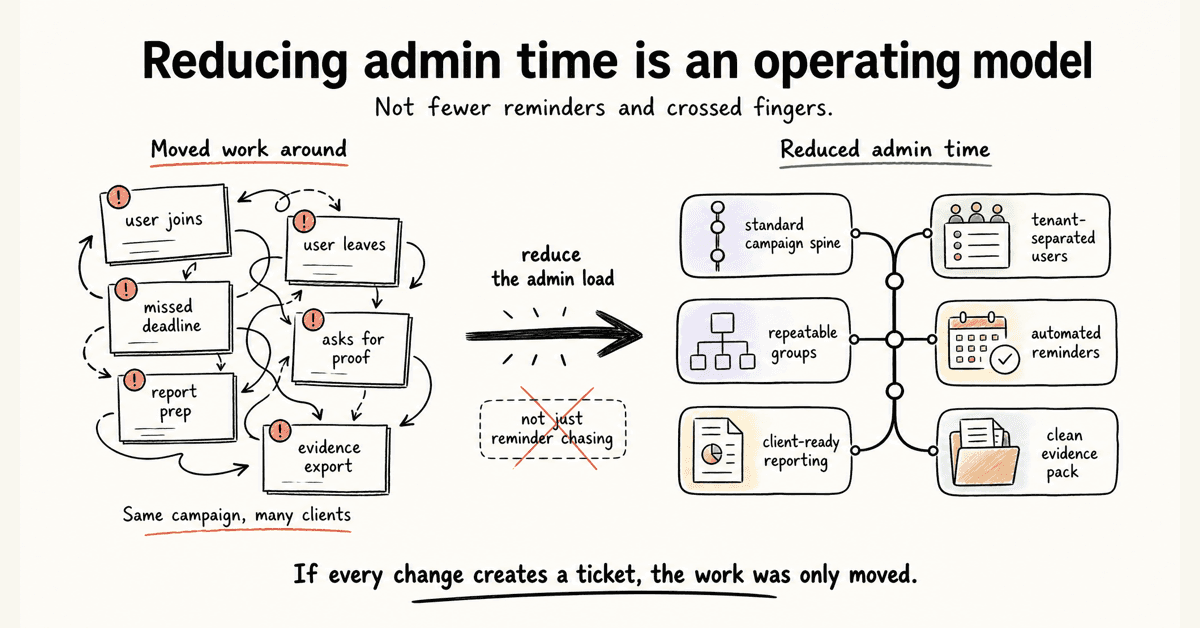
The fix is an operating model: standard campaign spine, tenant-separated users, repeatable groups, automated reminders, client-ready reporting, and a clean evidence pack.
If the campaign still creates a ticket every time a user joins, leaves, misses a deadline, or asks for proof, the MSP has not reduced admin time. It has only moved the work around.
What reducing admin time on security awareness campaigns means
A security awareness campaign looks simple from the outside.
Pick training. Assign users. Send reminders. Pull a report.
That is the clean version.
The MSP version has more moving parts:
- 30 clients with different directories.
- New starters joining every week.
- Leavers who should not remain active.
- Managers asking who is overdue.
- Clients wanting branded reports.
- Cyber insurance renewals asking for proof.
- Auditors asking what was assigned, when, and to whom.
- QBRs needing a summary that does not take half a day to build.
None of those tasks is dramatic. That is why they are dangerous for margin.
They arrive as small chores. Small chores become a delivery tax when the MSP repeats them across every client.
NIST SP 800-50 Rev. 1 frames cybersecurity and privacy learning as a managed program with a life cycle, role-based needs, behavior change, metrics, and regular improvement in Building a Cybersecurity and Privacy Learning Program. That matters because the campaign is not a one-off content send. It is an operating loop.
For an MSP, reducing admin time means designing that loop so the standard parts run the same way every time.
It does not mean every client gets identical training.
It means every client runs through a consistent delivery model.
Why security awareness campaign admin piles up for MSPs
The admin burden usually comes from 5 places.
1. User lifecycle work keeps moving
Training admin starts before a campaign launches.
Someone has to decide who is in scope. Someone has to add users. Someone has to remove leavers. Someone has to handle name changes, role changes, group changes, and missed imports.
That is why directory sync and provisioning matter.
Microsoft's documentation for automatic user provisioning with Microsoft Entra ID and KnowBe4 says the provisioning service can create users, remove users when they no longer require access, keep attributes synchronized, and provision groups and memberships in KnowBe4 Security Awareness Training. The same page tells admins to plan scope, map data, start small, test, monitor provisioning logs, and watch for quarantine states in Configure KnowBe4 Security Awareness Training for automatic user provisioning with Microsoft Entra ID.
The bigger point is not KnowBe4.
The point is the work category.
If user lifecycle is manual, every campaign becomes a user-management exercise.
2. Reminders become service tickets
Most campaign admin is not the launch.
It is the chasing.
Users do not start. Users half-finish. Managers ask for lists. A client contact wants a fresh overdue export. The MSP checks the portal, filters the campaign, sends a reminder, updates the client, then does it again next week.
KnowBe4's training notification documentation shows the usual reminder pattern: welcome emails, reminders after enrolment, reminders before due date, completion emails, past-due reminders, and notifications for users, managers, and admins in Training Campaign Notifications Overview.
That is the right category to automate.
The MSP should not be manually remembering which client needs a nudge on day 7 and which client wants manager escalation on day 14.
3. Reporting is treated as an afterthought
Training without reporting still creates work.
The work just moves to the end of the campaign.
The FTC's small-business cybersecurity guidance says businesses should train staff on a regular schedule, update employees when new risks appear, and track employee participation in Cybersecurity for Small Business.
That tracking requirement is where MSPs get caught.
If the report is not ready by client, campaign, user group, completion state, reminder history, and date range, the service desk has to rebuild the story manually.
KnowBe4's reporting guide shows the range of reporting categories SAT platforms can hold, including training activity, phishing activity, risk score, training status, incomplete training, unassigned users, and exportable PDF or CSV reports in Reporting Guide.
Reports are not just dashboard candy.
For MSPs, reports are how the service becomes client-visible and audit-usable.
4. Multi-client delivery multiplies tiny tasks
An internal IT team can tolerate some manual work if it runs 1 environment.
An MSP cannot.
A 10-minute task across 50 clients is not a 10-minute task.
Proofpoint's multi-tenant administration article is written for large distributed organizations, not MSPs, but it explains the same operating pattern: central teams keep top-level visibility and reporting while tenant admins tailor programs by business unit, maturity, region, role, or language in Introducing Multitenant Administration.
For MSPs, that principle is the work.
You need client separation without 50 separate admin rituals.
That is why multi-tenant security awareness training is not just a product feature. It is margin protection.
5. Threat and compliance needs keep changing
CISA tells small businesses that phishing threats evolve constantly and once-a-year training is not enough in Teach Employees to Avoid Phishing. The same page cites the FBI's 2024 Internet Crime Report and notes that phishing topped the list of the 5 most reported cybercrimes, with 193,407 complaints.
NIST CSF 2.0 includes awareness and training under the Protect function. PR.AT-01 covers general cybersecurity awareness and training, and PR.AT-02 covers specialized roles receiving training for relevant tasks. CSF Tools summarizes NIST's examples for PR.AT-01 and PR.AT-02, including social engineering recognition, suspicious activity reporting, basic cyber hygiene, specialized roles, and annual refreshers.
CIS Control 14 also calls for establishing and maintaining a security awareness program to influence behavior and reduce risk in Security Awareness and Skills Training.
That means the MSP cannot set and forget the campaign forever.
But it also cannot rebuild every client campaign from scratch every month.
The only sane path is a standard operating layer with controlled variation.
The MSP admin map for security awareness campaigns
Use this table before you buy a platform or rebuild your process.
It shows which tasks should be standardized, which can be automated, and which should stay under human review.
| Admin area | Manual pain for MSPs | What to standardize or automate | Evidence to keep |
|---|---|---|---|
| Client setup | Recreating settings, branding, and report preferences for each client | Client onboarding checklist, reusable setup template, white-label defaults, tenant naming rules | Setup record, brand settings, launch date |
| User enrolment | CSV imports, missed new starters, leavers left active, group errors | Directory sync where supported, group rules, scoped imports, exception queue | User roster, assignment scope, sync errors |
| Campaign launch | Rebuilding campaigns from memory | Standard campaign spine, approved topic library, role-based add-ons | Campaign summary, assigned topics, due dates |
| Reminders | Manual chasing, one-off emails, noisy client follow-up | Welcome, pre-due, overdue, manager, and admin reminders | Reminder schedule, sent reminders, overdue list |
| Reporting | Custom exports for every client request | Client-ready dashboards, PDF/CSV exports, QBR report format | Completion report, incomplete users, trend notes |
| Audit evidence | Screenshot hunting near renewal or audit time | Evidence pack with assignment, completion, dates, topics, reminders, and exports | Evidence export, source links, report timestamp |
| Exceptions | Users on leave, role changes, duplicate accounts, special groups | Exception queue with owner, reason, and next check date | Exception log, resolution notes |
| Review | No clear rhythm for improvement | Monthly MSP review, quarterly client summary, annual program reset | Review notes, next campaign actions |
The principle is simple.
Standardize what repeats. Review what carries judgment.
Do not ask a technician to remember a process that software and a runbook can carry.
How to reduce admin time on security awareness campaigns
This is the practical runbook.
1. Start with the campaign spine
Before picking content, define the campaign shape.
A workable MSP campaign spine might include:
- New-starter onboarding.
- Baseline phishing and social engineering training.
- Quarterly threat updates.
- Role-based modules for finance, executives, HR, service desk, and admins.
- Completion reminders.
- Client-ready reporting.
- Evidence export for audit, insurance, or QBR use.
The campaign spine is the part you do not want to debate every time.
It gives service delivery a default.
Client context still matters. The point is to stop every client from becoming a blank-page project.
2. Clean up user scope before launch
Do not start a campaign with a dirty roster.
Bad user data creates 3 kinds of admin later:
- Users who should have been included but were missed.
- Leavers who remain assigned and distort reports.
- Role or manager fields that break escalation.
Decide the source of truth for users.
For many clients, that means Microsoft 365 or another identity source. For others, it may still be a controlled CSV. Either way, define:
- Who is in scope.
- Which groups are used.
- Which users are excluded.
- Who owns exceptions.
- How new starters are added.
- How leavers are removed.
If the platform supports automated onboarding, test it against real client changes, not a perfect demo tenant.
The admin saving is not the first import.
It is every change after launch.
3. Build reminder rules once
Manual reminders feel harmless until they become a recurring ticket queue.
Set reminder logic before launch:
- Welcome message at enrolment.
- First reminder before the due date.
- Final reminder before the due date.
- Past-due reminder after the deadline.
- Manager notification for repeated non-completion.
- Admin summary for the MSP or client contact.
Keep the tone plain.
A reminder should tell the user what to do, by when, and where to go. It should not read like a cyber sermon.
For MSPs, the key is consistency. If every client has a different reminder pattern, reporting and support get harder.
Use client-specific wording where it helps. Keep the workflow standard.
4. Separate client branding from campaign logic
White-label delivery matters because clients want the service to feel like it belongs inside their environment.
But branding should not force a custom build every time.
Keep 2 layers separate:
- Experience layer: logo, sender identity, portal presentation, report cover, client-facing language.
- Operating layer: groups, due dates, reminders, evidence fields, report exports, review cadence.
If changing a logo also means rebuilding the whole campaign, the platform is making white-label delivery too expensive.
A useful white-label SAT workflow lets the client see their brand while the MSP keeps the same delivery machine underneath.
That is how brand value and margin can coexist.
5. Make reporting part of the campaign, not a cleanup job
Decide what the final report needs to show before the campaign starts.
At minimum, client-ready reporting should answer:
- Who was assigned?
- Who completed?
- Who is overdue?
- What topics were included?
- What reminders were sent?
- What exceptions were handled?
- What changed since the last report?
- What should the client do next?
If the report cannot answer these questions, the MSP will answer them manually.
That is not reporting. That is admin in a nicer jacket.
Use automated reports for the repeatable proof, then add human notes only where the client needs interpretation.
6. Put evidence in a client-ready pack
Evidence should not depend on screenshots.
A useful training evidence pack includes:
- Client name and tenant.
- Campaign name.
- Training topics.
- Assignment date.
- Due date.
- Completion status.
- Overdue users.
- Reminder history.
- Export date.
- Notes on exclusions or exceptions.
This does not turn training into a compliance guarantee.
It gives the client a clean record of what happened.
That distinction matters.
An MSP should be able to support an audit, cyber insurance renewal, or QBR without writing a custom explanation every time.
7. Review exceptions monthly
Automation reduces repeated work.
It does not remove exceptions.
Set a monthly exception review for:
- Failed syncs.
- Duplicate users.
- Users with no manager.
- Groups with no campaign assignment.
- Clients with no recent report.
- Campaigns with high non-completion.
- Users who remain overdue after manager escalation.
This is where human judgment belongs.
A service manager can look at exceptions and decide what needs attention. A technician should not be combing through every client portal hoping to find the problems.
8. Measure admin time like an MSP metric
Most MSPs measure completion.
Fewer measure delivery cost.
Track the operating metrics that show whether the service is scaling:
- Average setup time per client.
- Manual imports per month.
- User-sync exceptions per client.
- Manual reminders sent.
- Overdue-chasing tickets.
- Report preparation time.
- Evidence pack preparation time.
- Client questions after report delivery.
- Campaigns launched from a reusable template.
These are not vanity metrics.
They tell you whether security awareness is becoming a managed service or staying a project disguised as MRR.
What good low-admin security awareness campaigns look like
A low-admin campaign still has structure.
It is not lazy. It is disciplined.
Good looks like this:
- New client setup follows the same checklist every time.
- Users are scoped from a trusted source.
- Client tenants stay separated.
- Campaigns launch from approved templates.
- Role-based add-ons are available without a custom build.
- Reminders run without service desk chasing.
- Managers get useful nudges, not noise.
- Reports export by client.
- Evidence packs are ready before an audit or renewal request.
- Exceptions are reviewed on a rhythm.
- Pricing does not punish the MSP every time a client adds users.
That last point matters.
Admin time is only one part of the margin problem.
If the platform also charges per seat, the MSP gets squeezed twice: once by labour and once by user growth.
A flat-fee SAT model makes the operating work easier to package because the MSP is not recalculating seat cost every time a client grows.
The margin win is not just cheaper software.
It is fewer surprises.
Compliance and evidence mapping for campaign admin
MSPs should be careful with compliance language.
Training can support a compliance conversation. It does not satisfy a whole framework by itself.
Here is the safe mapping.
| Framework or guidance | What it says about awareness or training | Admin implication for MSPs |
|---|---|---|
| NIST SP 800-50 Rev. 1 | Build and manage a cybersecurity and privacy learning program with role-based needs, metrics, behavior change, and regular improvement | Treat campaigns as a life cycle, not a one-off send |
| NIST CSF 2.0 PR.AT-01 | Provide personnel with awareness and training for general tasks with cybersecurity risks in mind | Keep baseline training evidence for all in-scope users |
| NIST CSF 2.0 PR.AT-02 | Provide specialized-role awareness and training for relevant tasks | Keep role-based assignment and completion evidence |
| CIS Control 14 | Establish and maintain a security awareness and skills training program | Keep a maintained program record, not only ad hoc modules |
| CISA phishing guidance | Teach staff to recognize and report phishing, keep employees informed, and reinforce practices regularly | Use ongoing reminders and fresh topics, not annual-only campaigns |
| FTC small-business guidance | Train on a regular schedule, update employees on new risks, and track participation | Make participation tracking and reports part of the workflow |
The admin lesson is consistent.
If the campaign cannot show who was trained, what they were trained on, when it happened, and who remains overdue, the MSP will be forced to rebuild evidence manually.
That is exactly the work a managed service should remove.
Mistakes that create more admin later
Mistake 1: Using one generic annual campaign for every client
This saves time in month 1.
It creates weaker training, weaker reporting, and more awkward client conversations later.
CISA says once-a-year training is not enough because threats evolve constantly. A generic annual campaign also misses role pressure, such as finance fraud, executive impersonation, HR document handling, and service desk social engineering.
The better model is a standard spine with controlled role-based and threat-based variation.
Mistake 2: Customizing every client from scratch
The opposite mistake is just as expensive.
If every client gets a bespoke campaign structure, the MSP loses the benefit of a managed service.
Custom topics are fine. Custom admin is the problem.
Keep templates, reminders, evidence fields, and report formats standard unless there is a clear reason to change them.
Mistake 3: Trusting dashboards but not exports
Dashboards help operators.
Clients, insurers, and auditors often need a portable record.
If a report cannot be exported, shared, or attached to a QBR pack, the MSP may still have to copy data into a deck or spreadsheet.
That is avoidable work.
Test export quality before you rely on a platform for client reporting.
Mistake 4: Ignoring leavers and inactive users
Inactive users ruin reporting.
They inflate overdue counts, distort completion rates, and trigger client questions.
User lifecycle needs to be part of the campaign workflow, not a quarterly cleanup.
Mistake 5: Measuring only completion
Completion matters.
It is not the whole service.
For MSPs, delivery metrics matter too. If completion is high but the team spends hours chasing exports, answering report questions, or fixing user lists, the service is still expensive to run.
Measure the campaign and the operating cost.
How Defendwise fits
If you are choosing SAT for MSP clients, do not start with the biggest content library.
Start with the admin model.
Ask:
- Can we onboard a client without rebuilding the workflow?
- Can we manage each client separately from one operating layer?
- Can we add users without manual spreadsheet work?
- Can reminders run without service desk chasing?
- Can reports and evidence exports stand up in a client QBR?
- Can we package the service without a growing per-seat bill?
Defendwise is built for MSPs that want $399/month flat-rate security awareness training, unlimited users, white-label delivery, multi-tenant management, automated onboarding, and recurring reporting.
If reducing admin time on security awareness campaigns is on your buying checklist, start with Defendwise, then test the workflow against your real client runbook.
The right question is not, "How many modules are in the library?"
The right question is, "How many client chores does this remove every month?"
Frequently asked questions
How can MSPs reduce admin time on security awareness campaigns?
MSPs can reduce admin time by standardizing the campaign runbook, syncing users from a directory where possible, using reusable client templates, automating reminders, and exporting client-ready reports from the same workflow.
The goal is to remove repeated manual chasing, not to remove MSP judgment.
What creates the most admin work in security awareness campaigns?
The biggest admin load usually comes from user enrolment, user changes, overdue reminders, client-specific branding, reporting, audit evidence, and campaign status checks across many tenants.
Each task may look small for 1 client but becomes expensive across a client fleet.
Should security awareness campaigns be fully automated?
No.
Automate repeatable steps such as enrolment, reminders, report generation, and evidence export. Keep human review for campaign design, high-risk groups, client context, exception handling, and any claim a client may rely on for audit or insurance evidence.
Which metrics help prove that admin time is being reduced?
Track campaign setup time, manual reminder count, overdue-chasing tickets, report preparation time, evidence export time, user-sync exceptions, and client questions after reports are sent.
These are operating metrics. They show whether the MSP can scale the service without adding hidden labour.
How does multi-tenant security awareness training reduce admin time?
Multi-tenant security awareness training lets an MSP manage separate client environments from one operating layer.
That can reduce client-by-client portal switching, blended reporting, duplicate campaign setup, and evidence cleanup, provided tenant separation is clean.
What should MSPs automate first in security awareness training?
Start with user lifecycle, reminders, and reporting.
Those steps happen every month, touch every client, and create avoidable service tickets when handled manually. Campaign content and risk decisions should come after the operating basics are controlled.
Can reducing admin time hurt training quality?
Yes, if the MSP only shortens the work by sending generic training to everyone and ignoring client risk.
Good automation protects training quality by making the standard workflow lighter, while still allowing client-specific topics, groups, and evidence.
How does Defendwise help with reducing security awareness admin for MSPs?
Defendwise is built for MSPs that want flat-rate security awareness training, unlimited users, white-label delivery, multi-tenant management, automated onboarding, and recurring reporting.
If admin time is the pain, test how quickly you can enrol a client, chase completion, and export usable evidence.
Source notes
External source URLs used or checked:
- https://csrc.nist.gov/pubs/sp/800/50/r1/final
- https://nvlpubs.nist.gov/nistpubs/CSWP/NIST.CSWP.29.pdf
- https://csf.tools/reference/nist-cybersecurity-framework/v2-0/pr/pr-at/pr-at-01/
- https://csf.tools/reference/nist-cybersecurity-framework/v2-0/pr/pr-at/pr-at-02/
- https://www.cisecurity.org/controls/security-awareness-and-skills-training
- https://www.cisa.gov/audiences/small-and-medium-businesses/secure-your-business/teach-employees-avoid-phishing
- https://www.cisa.gov/sites/default/files/2023-10/Phishing%20Guidance%20-%20Stopping%20the%20Attack%20Cycle%20at%20Phase%20One_508c.pdf
- https://www.ftc.gov/business-guidance/small-businesses/cybersecurity
- https://learn.microsoft.com/en-us/entra/identity/saas-apps/knowbe4-security-awareness-training-provisioning-tutorial
- https://support.knowbe4.com/hc/en-us/articles/115010848868-Training-Campaign-Notifications-Overview
- https://support.knowbe4.com/hc/en-us/articles/360007952894-Reporting-Guide
- https://www.proofpoint.com/us/blog/security-awareness-training/introducing-multi-tenant-administration-for-global-security-education
- https://usecure.io/feature/integrations
- https://www.verizon.com/business/resources/T16f/reports/2025-dbir-data-breach-investigations-report.pdf
- https://www.ic3.gov/AnnualReport/Reports/2024_IC3Report.pdf