How quickly can I deploy white-label SAT for my clients?
How quickly can I deploy white-label SAT? Use this MSP rollout timeline to launch training without creating admin debt.
DefendWise
DefendWise
TL;DR
How quickly can I deploy white-label SAT for my clients? Faster than most MSPs expect, if the rollout is treated as an operating workflow rather than a one-off platform setup.
The first client should prove the process: branding, tenant setup, user source, training assignment, reminders, support path, and client-ready reporting. After that, the MSP should roll clients out in batches using the same template.
A platform may support quick setup. Defendwise's public site, for example, describes deployment in 10 minutes. The operational question is different: can the MSP launch a client in a way that protects its brand, keeps the roster clean, gives users clear instructions, and produces evidence the client can read?
That is the difference between a fast login and a fast service launch.
The honest answer: setup speed and rollout speed are not the same thing
MSPs often ask the speed question because they are not really buying a training library. They are trying to add a managed service to many clients without adding another admin queue.
So there are 2 clocks.
The first clock is platform setup. This is the work of creating the account, applying MSP branding, configuring the client tenant, importing or syncing users, and assigning starter training.
The second clock is client-ready rollout. This is the work of making sure the client understands what is happening, emails look trustworthy, users land in the right tenant, reports are separated, exceptions are handled, and the MSP can answer the first support questions.
A serious MSP should care about both.
CISA tells small and medium-sized businesses to train employees to recognize, avoid, and report phishing because phishing can lead to credential theft, business account compromise, malware, and ransomware. That makes fast coverage useful. But fast coverage still needs good process. A confusing launch can make training emails look suspicious, create support noise, and weaken client trust.
NIST's awareness, training, and education material points back to role-based training and a learning continuum across awareness, training, and education. That matters for deployment because the goal is not simply to send a module. The MSP needs a program that can keep working after the first invite.
A practical deployment timeline for MSPs
Use this as a planning model, not a contractual promise. The exact timing depends on client size, identity data, branding decisions, email controls, and how much approval the client needs before users see training.
| Phase | What happens | Fast path | Watchouts |
|---|---|---|---|
| 0. Preflight | Pick pilot client, confirm owner, gather logo/domain/user source/report needs | Same day | Starting with the messiest client first |
| 1. MSP workspace setup | Apply MSP brand, admin roles, default templates, reporting defaults | Same day | Wrong sender identity or unfinished report branding |
| 2. Client tenant setup | Create client tenant, confirm domain, map admins, set launch dates | Same day | Blended tenants or unclear client naming |
| 3. User source | Microsoft 365 sync, SCIM, CSV import, or manual fallback | Same day to a few days | Dirty user data, leavers, shared inboxes, contractors |
| 4. Campaign setup | Assign starter training, due dates, reminders, notifications | Same day | Generic assignment for users who need different handling |
| 5. QA | Test user flow, branded email, portal, report, exports, support path | Same day | Skipping QA because the platform looks ready |
| 6. Pilot launch | Send to 1 friendly client or controlled user group | 1 week window | Launching to all clients before support scripts are ready |
| 7. Batch rollout | Roll out by client group, reuse template, tune exceptions | Weekly batches | Each batch becoming a custom project |
| 8. First report | Send branded completion/risk/evidence summary to client | After first reporting cycle | Reports that show activity but not the client's next action |
The key is not to stretch the rollout. The key is to avoid false speed.
A 10-minute setup that produces bad client data, unclear emails, and weak reports will create more work than a slightly slower pilot with a clean checklist.
What must be ready before day 1
The best deployment work happens before anyone clicks an invite.
1. A pilot client with low political risk
Do not start with the biggest, noisiest, or most regulated client unless there is a hard reason.
Start with a client that will give honest feedback, has a manageable user base, and already trusts the MSP. The pilot should test the service workflow, not the MSP's ability to survive chaos.
Good pilot criteria:
- one clear business owner;
- reasonably clean Microsoft 365 or user data;
- a known manager or admin contact;
- enough users to test reminders and reporting;
- no unusual legal review before launch;
- willingness to review the first report.
This gives the MSP a real launch without turning day 1 into a rescue job.
2. White-label settings that pass the trust test
White-label SAT is partly about branding. It is also about trust.
If the email says one thing, the portal says another, and the report looks like a third-party export, users may treat the launch as suspicious or low priority. That is bad for completion and worse for the MSP brand.
Before launch, check:
- MSP logo and brand name;
- sender name and reply path;
- portal copy and client-facing labels;
- report cover page or header;
- support contact;
- client name spelling;
- any user-facing instructions.
A white-label security awareness training setup should make the service feel like part of the MSP's managed package. It should not make the client feel like it has been handed to another vendor.
3. User data that will not embarrass the report
The roster is where many deployments slow down.
Microsoft describes app provisioning in Entra ID as the automatic creation, update, and removal of user identities and roles for applications. That is useful because SAT roster data changes over time: new starters join, people move roles, contractors leave, and shared mailboxes creep into exports.
SCIM is one standard path for that kind of provisioning. RFC 7644 defines the SCIM protocol for managing cross-domain identity resources such as users and groups. Microsoft also explains that SCIM helps normalize user and group provisioning across apps.
MSPs do not need to turn every client into an identity-governance project before launching training. They do need to know where the roster comes from.
Use this preflight check:
- Which source is authoritative: Microsoft 365, HR, CSV, or manual list?
- Are leavers removed or deactivated?
- Are shared mailboxes excluded?
- Are contractors included or excluded?
- Are managers mapped for reporting or escalation?
- Are privileged users tagged for extra training?
- Can the MSP prove which users were in scope on launch day?
A multi-tenant SAT platform should help the MSP keep users and evidence separated by client. It still needs clean inputs.
4. A starter campaign that is narrow enough to finish
The first launch should not be a 20-module curriculum.
Start with a practical baseline: phishing, password/account safety, reporting suspicious messages, and any client-required policy acknowledgement. CISA's phishing guidance for small and medium-sized businesses stresses training employees to spot suspicious messages, verify requests through known contact paths, and report suspected phishing.
That is enough for a first deployment.
After the client sees completions and the MSP sees how the workflow behaves, the program can expand into role-based modules, phishing simulations, AI voice scams, wire-transfer approval, or compliance-specific training.
The first campaign should prove 4 things:
- users can access the portal;
- users understand why training arrived;
- reminders work;
- reports make sense to the client.
Do not make the first campaign carry every risk topic at once.
5. A client communication note that sounds like the MSP
Many SAT rollouts fail softly because the first user-facing message is vague.
Users need to know:
- who is sending this;
- why they are receiving it;
- what they need to do;
- how long it should take;
- where to ask for help;
- how to verify the message if they are unsure.
That last point matters. Training that teaches phishing awareness should not ask users to blindly trust an unfamiliar email.
Give clients a short launch note they can approve. Give users a plain instruction. Give managers a short escalation path for overdue users.
This is also where MSP branding earns its keep. The client should see the MSP as the owner of the service.
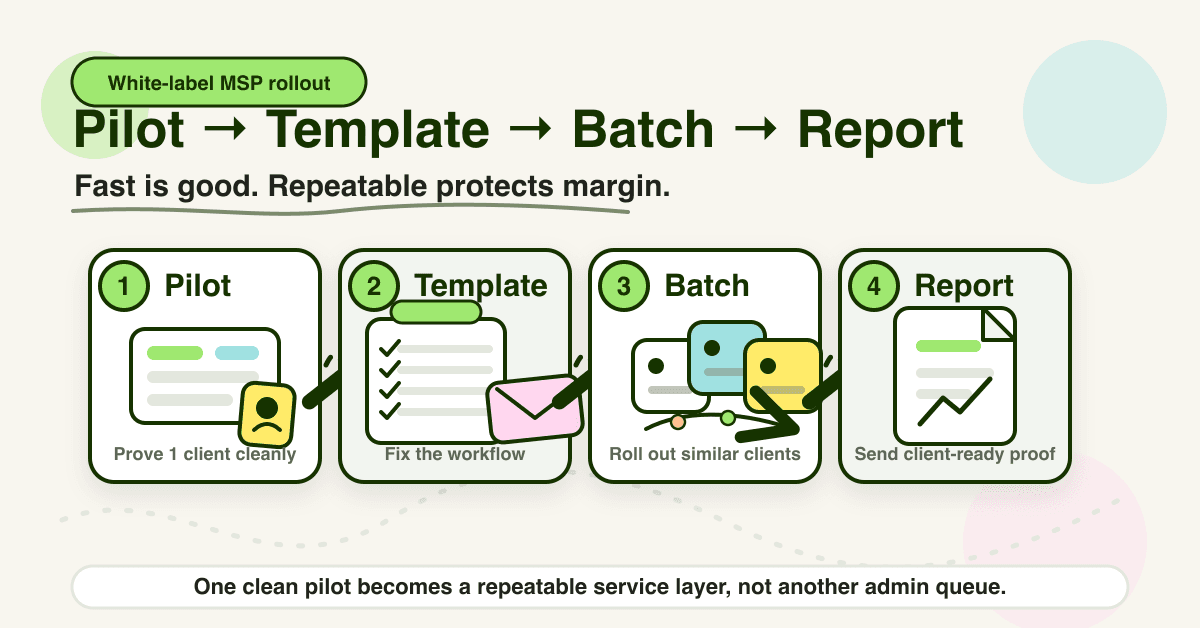
The rollout model: pilot, template, batch, report
The fastest clean rollout pattern is not "turn everything on."
It is this:
- Pilot one client.
- Fix the setup checklist.
- Save the template.
- Roll out in batches.
- Report back before the next batch.
Step 1: pilot one client
The pilot is not a proof-of-concept forever. It is a real deployment with a small blast radius.
Use it to test:
- branded invite email;
- login and training path;
- roster accuracy;
- reminder timing;
- completion report;
- support questions;
- exception handling;
- client handoff.
Keep a simple pilot log. The goal is to remove surprises before the second and third client.
Step 2: fix the checklist
After the pilot, update the checklist with the problems that actually happened.
Common fixes:
- exclude shared mailboxes by default;
- add a client approval step for launch copy;
- add a test user before every client launch;
- add a manager-contact field;
- create a standard overdue-user message;
- define what happens when a user leaves during the campaign;
- add a report QA step before sending to the client.
This is how the rollout gets faster. Not by skipping work, but by turning repeated work into a controlled sequence.
Step 3: save the template
A template should cover the parts that repeat:
- starter campaign;
- default reminders;
- reporting format;
- launch email;
- client admin setup;
- user-source checklist;
- evidence/export naming;
- support response snippets.
The template should not remove judgment. It should remove blank-page work.
Step 4: roll out by batch
Batch by similarity.
Good batch groups:
- small professional-services clients;
- clients with clean Microsoft 365 data;
- compliance-heavy clients that need evidence first;
- clients already buying a security bundle;
- clients with the same manager-reporting pattern.
Avoid mixing every client type into the same rollout week. A batch of 5 similar clients is easier than 5 unrelated edge cases.
Step 5: report before the next batch
Do not wait 6 months to prove value.
The first report should show:
- who was assigned;
- who completed;
- who is overdue;
- what topics were covered;
- what exceptions exist;
- what the MSP recommends next.
That turns training from an invisible background task into a client-facing managed service.
Defendwise supports automated reports and a flat-fee model for MSPs. The point is not just cheaper training. The point is covering every user and every client without making reporting a monthly spreadsheet job.
What good looks like after the first launch
A good white-label SAT deployment has a visible trail.
By the end of the first client launch, the MSP should be able to answer these questions without digging through separate portals and spreadsheets:
- Which users were in scope?
- Which users were excluded, and why?
- Which training was assigned?
- Which reminders were sent?
- Who completed training?
- Who is overdue?
- What does the client need to do next?
- What evidence can be used for QBRs, cyber insurance, or audits?
This is where compliance evidence starts to matter.
NIST's awareness and training material is built around training people based on roles and responsibilities. CISA's phishing guidance is practical and action-based. Microsoft Entra and SCIM sources show why lifecycle data matters. Together, they point to a simple deployment standard: the program should stay accurate as the client changes.
If a user joins after the first launch, the workflow should catch them.
If a user leaves, the record should not distort reporting.
If a manager asks for status, the MSP should not build a one-off spreadsheet.
If the client asks for proof at renewal, QBR, insurance questionnaire, or audit time, the MSP should have a reportable record.
That is what "deployed" should mean.
Mistakes that make deployment slower
Launching before the brand is credible
A white-label service with mismatched emails, generic sender names, or half-branded reports looks unfinished.
Fix the client-facing surface before users see it.
Treating CSV import as the whole onboarding plan
CSV can be useful, especially for small clients or quick pilots. But it can also hide stale users, shared mailboxes, wrong managers, and leavers.
If CSV is the first path, define how the roster will stay current after launch.
Starting with every client
Portfolio-wide launch sounds efficient. It is often how MSPs create 20 support threads at once.
Pilot first. Batch second.
Sending training without client context
Users are right to distrust unexpected training emails.
Give the client a launch note. Tell users why training is arriving. Tell them how to verify it.
Reporting only completions
Completion is useful. It is not the whole service.
Clients also need overdue users, exceptions, topic coverage, trend direction, and next steps. MSPs need reports that support QBRs and renewals, not just evidence that someone clicked through a module.
How a flat-rate MSP SAT platform helps
The deployment question becomes much easier when the platform matches the MSP business model.
Per-seat pricing makes every new user and every new client feel like a billing decision. Flat-rate SAT removes that friction. Multi-tenant management keeps client work in one operating layer. White-label delivery keeps the MSP as the visible service provider. Automated onboarding and reporting reduce the recurring work that makes small clients expensive to serve.
Defendwise is built for MSPs: $399/month flat, unlimited users, unlimited client organizations, white-label delivery, multi-tenant control, automated onboarding, Microsoft 365 sync, Zapier integration, AI-native training content, and branded monthly reports.
If you want to test the rollout, start with one client in a free 7-day trial. Do the pilot properly. Then decide whether the process is ready for the rest of your base.
Frequently asked questions
How quickly can I deploy white-label SAT for my clients?
A platform setup may be quick, and Defendwise publicly describes deployment in 10 minutes. A clean MSP service launch should still include preflight, branding, user source, assignment, QA, communication, and reporting. The fastest safe pattern is one pilot client, then batch rollout.
What should I test in the first white-label SAT deployment?
Test the branded email, portal access, user roster, training assignment, reminder rules, report output, exports, support path, and exception handling. Include at least one test user before sending invites to the client.
Is white-label SAT only about adding my logo?
No. Logo placement is only one part. White-label SAT should make the service feel owned by the MSP across the portal, emails, reports, support path, and client communication.
Do I need Microsoft 365 sync before I launch SAT?
Not always. Microsoft 365 sync can make roster management easier when client identity data is clean. A CSV pilot can work for smaller clients, but the MSP still needs a plan for joiners, movers, leavers, contractors, and shared mailboxes.
Should training launch before or after the client's QBR?
If the QBR is close, use it to introduce the program and get client buy-in. If training has already started, use the QBR to show coverage, completions, overdue users, exceptions, and next steps. Either way, do not let QBR reporting become a separate manual process.
How many clients should an MSP deploy at once?
Start with one client. After the workflow is clean, roll out in small batches grouped by client similarity. That protects the MSP's brand and gives the team room to fix support and reporting issues before scaling.
What makes white-label SAT deployment hard across many clients?
The hard part is not sending training. It is keeping client tenants separate, user data current, exceptions visible, reminders consistent, reports useful, and support manageable across the whole client base.
Can Defendwise help with white-label SAT deployment for MSPs?
Yes. Defendwise is built for MSPs with flat-rate pricing, unlimited users, unlimited client organizations, white-label delivery, multi-tenant management, automated onboarding, Microsoft 365 sync, Zapier integration, AI-native training content, and branded reports.