Bulk import users to a multi-tenant training platform: an MSP guide
Bulk import users to a multi-tenant training platform without breaking tenant separation, training coverage, or audit evidence.
Defendwise
DefendWise
TL;DR
Bulk import users to a multi-tenant training platform carefully, or the first spreadsheet becomes the first audit problem. For MSPs, the goal is not simply to upload names quickly. The goal is to preserve tenant separation, assign the right training, keep learner lifecycle data clean, and leave behind records that can support client reporting, ISO 27001 conversations, cyber insurance questionnaires, and QBRs.
A practical MSP workflow starts with one clean import template, one client tenant at a time, clear required fields, dry-run validation, post-import QA, and a plan for ongoing joiners, movers, and leavers. CSV upload is useful for launch. Directory sync or SCIM-style provisioning is useful for lifecycle control when the client and platform are ready for it.
What bulk user import means in a multi-tenant training platform
Bulk user import is the process of adding or updating many learners in one action instead of creating them one by one. In security awareness training, that usually means a CSV upload, an Excel import, a directory sync, SCIM provisioning, or an API-fed workflow.
In a single-company training account, bulk import is mostly an admin shortcut. In an MSP environment, it is more serious. A multi-tenant platform has to keep each client organisation separate while still giving the MSP one operating view across the fleet.
That means the import needs to answer 5 questions before anyone receives training:
- Which client tenant does this learner belong to?
- What training, campaign, or policy applies to them?
- What role, department, or group should drive training depth?
- What evidence will the client need later?
- What happens when this user leaves, changes role, or moves client scope?
Public vendor documentation shows the pattern. Security Journey describes CSV uploads that can add, update, archive, and manage learner attributes in bulk, with fields such as business unit, company, country, department, manager, job role, and admin flags. Skillsoft’s documentation shows the same operational reality: bulk import can add or update users, but headers and blank fields need careful handling. ESET’s training docs include a review-and-map step before import, which is exactly the kind of QA step MSPs should keep.
The point is not that every MSP needs the same fields. The point is that user import is where the training programme starts becoming operational truth.
Why this matters for MSPs
MSPs do not manage 1 neat employee list. They manage many client lists, each with its own naming habits, domains, lifecycle gaps, executive exceptions, contractor edge cases, and compliance pressure.
If the import process is sloppy, the pain shows up later:
- A client’s inactive users receive training reminders.
- New starters never get assigned.
- A shared mailbox or contractor account distorts completion reporting.
- The MSP cannot prove which users were in scope at the time of assignment.
- A QBR report blends client data or hides exceptions.
- An audit request turns into spreadsheet archaeology.
NIST SP 800-50 Rev. 1 frames cybersecurity and privacy learning as a lifecycle programme, not a one-off training push. That matters here. A bulk import is not just a launch action. It is the first lifecycle checkpoint for who is in the programme, what they are expected to complete, and how the organisation will evaluate coverage over time.
CIS Control 14 takes a similar direction. It is about establishing and maintaining security awareness and skills training to influence workforce behaviour. Maintaining is the hard word. It means the user list cannot be treated as a once-a-year spreadsheet.
For MSPs, this becomes a service-delivery problem. If the user-import process does not scale, security awareness becomes another admin-heavy add-on your team has to nurse across every client.
CSV import, directory sync, and SCIM: which one fits?
Most MSPs should not treat CSV import and directory sync as enemies. They solve different problems.
CSV import is usually the fastest way to get a client into training. It is useful when the client has a clean HR export, when the pilot needs to start this week, or when the client is too small to justify identity integration work on day 1.
Directory sync is better when the client already has Microsoft Entra ID or another identity source that can support ongoing user changes. Microsoft describes SCIM as a standard way to automate identity lifecycle management between identity providers and applications, including creating, updating, disabling, deleting, and managing group membership. RFC 7644 also defines SCIM resources for users, groups, bulk operations, filtering, modification, deletion, and multi-tenancy.
For MSPs, the decision is practical:
| Import method | Best fit | Watch-outs | MSP operating rule |
|---|---|---|---|
| Manual user creation | Tiny pilot, 2–5 named users | Does not scale, easy to forget exceptions | Use only for demos or emergency fixes |
| CSV import | First client launch, clean HR export, fast rollout | Header errors, stale lists, tenant mix-ups | Use a standard template and post-import QA |
| CSV update file | Monthly or quarterly roster clean-up | Blank fields can remove data in some platforms | Export current roster first, then edit deliberately |
| Directory sync | Ongoing joiner/mover/leaver control | Requires identity access and mapping decisions | Use when client identity hygiene is mature enough |
| SCIM provisioning | Larger clients, SaaS lifecycle automation | Needs supported app, schema mapping, secure tokens | Treat as lifecycle infrastructure, not just import |
| API workflow or Zapier-style automation | MSP workflow integration and ticketing handoff | Can create silent bad data at scale | Add logs, owner, rollback, and sample checks |
The safest answer is often: CSV for launch, sync for lifecycle, and a repeatable exception process for everything that does not fit the neat model.
What MSPs actually need before import
Before importing users, collect the operational fields that will matter after training starts. Do not ask the client for a giant spreadsheet just because the platform can accept one. Ask for the fields that support assignment, evidence, and reporting.
A useful MSP import template usually includes:
- Client or tenant name.
- Email address or user principal name.
- First name and last name.
- Active/inactive status.
- Department or business unit.
- Job role or training group.
- Manager email, if manager escalation is part of the workflow.
- Country or region, if reporting or policy differs by geography.
- Start date, if onboarding campaigns need to be staged.
- Contractor or employee flag, if the client treats them differently.
- Exclusion reason, if a user is out of scope.
- Notes for shared mailboxes, service accounts, or break-glass accounts.
Security Journey’s CSV documentation is a useful public example of why fields matter. It lists learner attributes such as company, department, employee number, job role, manager details, team, and security champion. It also calls out formatting details such as exact headers, TRUE/FALSE values, ISO country codes, and UTF-8 encoding. Those are small details until an import fails at 4:52 pm.
Skillsoft’s documentation shows another common trap: when updating users, blank fields may remove existing values, with exceptions. That is the kind of behaviour an MSP should test once and record in the runbook, not rediscover during a client rollout.
Step-by-step: bulk import users without creating admin debt
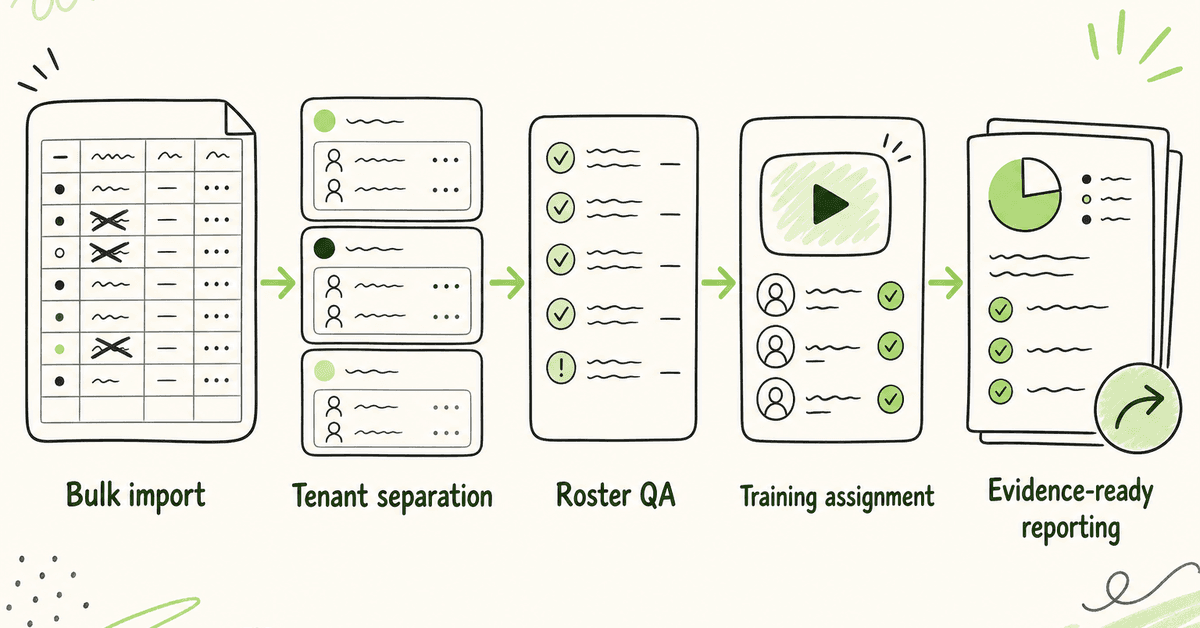
1. Confirm the tenant boundary first
Start with one client tenant. Confirm the client name, domain, reporting owner, training scope, and admin access model before any upload.
Do not import 12 clients from one combined spreadsheet unless the platform has a clear tenant identifier and a safe review step. Tenant separation is the point of multi-tenant SAT. If the import process blurs it, the dashboard will not save you later.
2. Create a standard MSP import template
Build one template your team can reuse. Keep it simple enough for clients to fill in, but structured enough for reporting.
Use required fields for identity and training scope. Use optional fields only when they drive assignment, reporting, or evidence. If a field will never appear in a report, campaign rule, or exception log, question whether it belongs in the import.
3. Clean the data before upload
Normalize email addresses, remove duplicate users, split first and last names where required, check country codes, and mark inactive or excluded accounts clearly.
This is where MSPs should be boring. A clean file beats a heroic recovery every time. CSV docs from multiple vendors warn about exact headers, required formats, special characters, and UTF-8 encoding. Those details are not clerical. They decide whether the first launch is clean or noisy.
4. Validate on a small sample
If the platform supports preview, review, or field mapping, use it. ESET’s CSV workflow includes a review step where columns are mapped before import. That is the right posture.
For a larger client, test 5–10 representative users first: an executive, a manager, a frontline user, a contractor, and a normal employee. Confirm the right tenant, group, campaign assignment, and reporting attributes before uploading everyone.
5. Import one tenant at a time
One client at a time is slower on day 1 and faster by day 30. It gives your team a clean audit trail, a clearer rollback path, and a simpler way to explain what happened.
If the client has multiple business units, decide whether they belong as groups inside one tenant or as separate tenants before import. Do not let the spreadsheet make that architecture decision by accident.
6. Export the post-import roster
After import, export or screenshot the roster if the platform allows it. Check total users, active users, excluded users, managers, departments, and campaign assignments.
This is not busywork. It creates an evidence checkpoint for what the MSP imported, when it was imported, and what scope the client agreed to start with.
7. Assign training after roster QA, not before
Do not immediately blast welcome emails and assignments if the roster has not been checked. A bad upload plus automated reminders is how clients lose confidence in a white-label service.
Once QA passes, assign the first campaign or onboarding path. Keep the assignment rule visible: all active users, all users in named groups, executives only, new starters only, or whatever the client approved.
8. Decide the lifecycle path before the first leaver
Bulk import solves the first list. It does not solve staff changes.
Before handoff, decide how new starters, movers, and leavers will be handled. Options include monthly CSV updates, client HR exports, directory sync, SCIM provisioning, workflow automation, or MSP ticketing triggers. The exact implementation should be checked before technical setup copy.
9. Keep exceptions visible
Not every account should be trained. Some accounts are shared mailboxes, service accounts, break-glass accounts, vendor accounts, or test users. The problem is not excluding them. The problem is excluding them invisibly.
Keep an exception reason. At QBR or audit time, it is better to show “excluded: shared mailbox, no interactive login” than to explain why a client’s completion rate looks wrong.
What good looks like
A good MSP bulk-import workflow leaves a clear trail. The client does not need to see every admin click, but the MSP should be able to reconstruct the import without guesswork.
Good looks like:
- One client tenant selected before upload.
- A dated import file or system log.
- Required fields documented.
- Post-import roster checked.
- Training assignment rule recorded.
- Exclusions marked with reasons.
- Welcome/reminder timing controlled.
- Lifecycle process agreed before rollout.
- Client-ready reporting available after the first campaign.
For compliance-adjacent clients, this matters. ISO/IEC 27001 is a management-system standard for managing information security risks. Awareness evidence is only one part of that system, but it should still be clean. ACSC’s Essential Eight guidance is technical-control focused, but MSPs still need supporting operational records around people, access, exceptions, and client governance when they report security posture.
The import is where those records begin.
Mistakes to avoid
Importing every client from one spreadsheet
A master spreadsheet feels efficient. It becomes risky when client boundaries are unclear, domains overlap, or a bad filter sends users to the wrong tenant.
Use one source file per client unless you have a platform-supported tenant field, preview step, and rollback process.
Treating inactive users as harmless
Inactive users can distort reporting and reminders. They can make completion rates look worse than they are, or worse, make the client think the MSP does not understand the staff list.
Mark inactive users deliberately. If the platform supports archiving through CSV, test exactly how that behaves.
Over-collecting user data
A training platform does not need every HR field. Extra fields create privacy, mapping, and maintenance load.
Collect what supports training assignment, reporting, evidence, and exception handling. Cut the rest.
Starting automation before the template is stable
Automation magnifies whatever you feed it. A Zapier flow, SCIM connector, or API script that imports bad department names every day is worse than a manual import error once.
Stabilise the field map first. Then automate.
Letting seat pricing decide coverage
If every added learner creates a new bill, the import conversation becomes a margin conversation. That is how edge users, part-time staff, contractors, and smaller clients get left out.
A flat-fee model changes the operating decision. The MSP can import everyone in scope and manage exceptions based on risk, not per-seat cost.
Framework and evidence mapping
Bulk import does not make a client compliant. It supports the recordkeeping behind a training programme.
Here is a practical mapping MSPs can use when setting up import and reporting fields:
| Evidence need | Import field or workflow | Why it matters |
|---|---|---|
| Training scope | Tenant, active status, user type | Shows who was expected to train |
| Role-aware training | Department, job role, group | Supports different training depth for executives, finance, IT, or frontline teams |
| Assignment proof | Campaign group, assignment date | Shows who was assigned what and when |
| Completion proof | Learner ID, completion status, timestamp | Supports reporting and audit evidence |
| Exception handling | Exclusion flag, reason, owner | Explains why specific accounts are out of scope |
| Manager follow-up | Manager email or escalation group | Helps chase completion without MSP manual babysitting |
| Lifecycle control | Source system, sync status, archived flag | Supports joiner, mover, and leaver hygiene |
NIST SP 800-50 Rev. 1 emphasises lifecycle management and evaluation. CIS Control 14 emphasises maintaining a programme. Microsoft’s SCIM guidance explains the identity side: create, update, disable, delete, and manage groups between identity providers and applications.
Put those together and the MSP lesson is simple: the import workflow should support both training delivery and evidence hygiene.
How a flat-rate MSP SAT platform helps
A flat-rate, multi-tenant SAT platform helps when it lets MSPs cover the full eligible user population without running a seat-by-seat margin calculation first.
DefendWise is built for MSPs with flat-fee pricing, unlimited users, unlimited client organisations, white-label delivery, multi-tenant management, automated onboarding, AI-native training content, and reporting. For this article, the safe product point is not “we support every import method in every edge case.” It is that MSPs should not have to choose between clean coverage and predictable margin.
If you are evaluating bulk import in any SAT platform, ask these questions before the first client rollout:
- Can I import by client tenant without data mixing?
- Can I update and archive users safely?
- Can I map groups, roles, and managers?
- Can I export a post-import roster?
- Can I show assignment and completion evidence later?
- Can I automate lifecycle updates when the client is ready?
- Can I cover everyone in scope without a per-seat margin penalty?
That is the bar. Not a prettier upload button.
Related reading: hidden cost of managing security awareness training for MSPs, how to onboard clients to a multi-tenant SAT platform, and automated onboarding for MSP SAT.
Start a free 7-day trial and test your client onboarding workflow against a real import process.
Frequently asked questions
What does bulk import users to a multi-tenant training platform mean?
It means adding or updating many learners at once, usually from a CSV file, spreadsheet, directory sync, SCIM workflow, or API connection. In a multi-tenant MSP platform, the import must keep each client tenant separate while still giving the MSP a single operating view.
Is CSV import enough for MSP security awareness training?
CSV import can be enough for first rollout, pilots, and smaller clients. It is not always enough for ongoing lifecycle management. If the client has regular staff changes, the MSP should plan a repeatable update process or directory-sync path.
What fields should MSPs include in a training user import?
Use fields that support identity, assignment, reporting, and exceptions. Email, name, tenant, active status, department, role, group, manager, and exclusion reason are usually more useful than a large dump of HR fields.
How can MSPs stop users being imported into the wrong client tenant?
Import one tenant at a time, use a client identifier, validate a small sample, review field mapping, and export the post-import roster. Also restrict admin access so technicians only touch the tenants they are meant to manage.
Should a platform support SCIM for training users?
SCIM is useful when the client and platform are ready for automated user and group provisioning. It can reduce manual joiner, mover, and leaver work. It is not a substitute for deciding the right training groups, exception rules, and reporting fields.
Can bulk import support ISO 27001 awareness evidence?
Yes, indirectly. ISO 27001 evidence still depends on the client’s ISMS and audit scope, but a clean import helps show who was in scope, who was assigned training, who completed it, and which accounts were excluded with reasons.
How does flat-fee pricing affect bulk import?
Flat-fee pricing removes the incentive to trim the user list to protect margin. The MSP can import everyone in scope, then handle exceptions based on risk and client policy instead of license cost.
Where does DefendWise fit?
DefendWise is a flat-fee, AI-native SAT platform for MSPs with unlimited users, unlimited client organisations, white-label delivery, multi-tenant management, automated onboarding, and reporting. The next step is to start a free 7-day trial and test the client onboarding workflow against your real import needs.
Source notes
External source URLs used or checked:
- Security Journey, “Uploading Learners with a CSV”: https://help.securityjourney.com/configure-and-upload-.csv-files
- Skillsoft Percipio, “Bulk Import Users”: https://documentation.skillsoft.com/en_US/compliance/content/A_Administrator/admn_import.htm
- ESET Cybersecurity Awareness Training, “Upload and manage users via CSV”: https://help.eset.com/cybertraining/en-US/manage_users_csv.html
- SafetyCulture Help Center, “Bulk manage users via CSV or Excel”: https://help.safetyculture.com/005176
- Microsoft Learn, “SCIM provisioning planning guidance for Microsoft Entra ID”: https://learn.microsoft.com/en-us/entra/identity/app-provisioning/use-scim-to-provision-users-and-groups
- RFC Editor, “RFC 7644: System for Cross-domain Identity Management: Protocol”: https://www.rfc-editor.org/info/rfc7644/
- NIST CSRC, “SP 800-50 Rev. 1, Building a Cybersecurity and Privacy Learning Program”: https://csrc.nist.gov/pubs/sp/800/50/r1/final
- CIS, “CIS Critical Security Control 14: Security Awareness and Skills Training”: https://www.cisecurity.org/controls/security-awareness-and-skills-training
- ISO, “ISO/IEC 27001:2022”: https://www.iso.org/standard/27001
- Australian Cyber Security Centre, “Essential Eight”: https://www.cyber.gov.au/business-government/asds-cyber-security-frameworks/essential-eight
Internal links used: