How to onboard clients to a multi-tenant SAT platform
How to onboard clients to a multi-tenant SAT platform with a repeatable MSP runbook for users, campaigns, reporting, and evidence.
DefendWise
DefendWise
TL;DR
How to onboard clients to a multi-tenant SAT platform is not a question of where to click first.
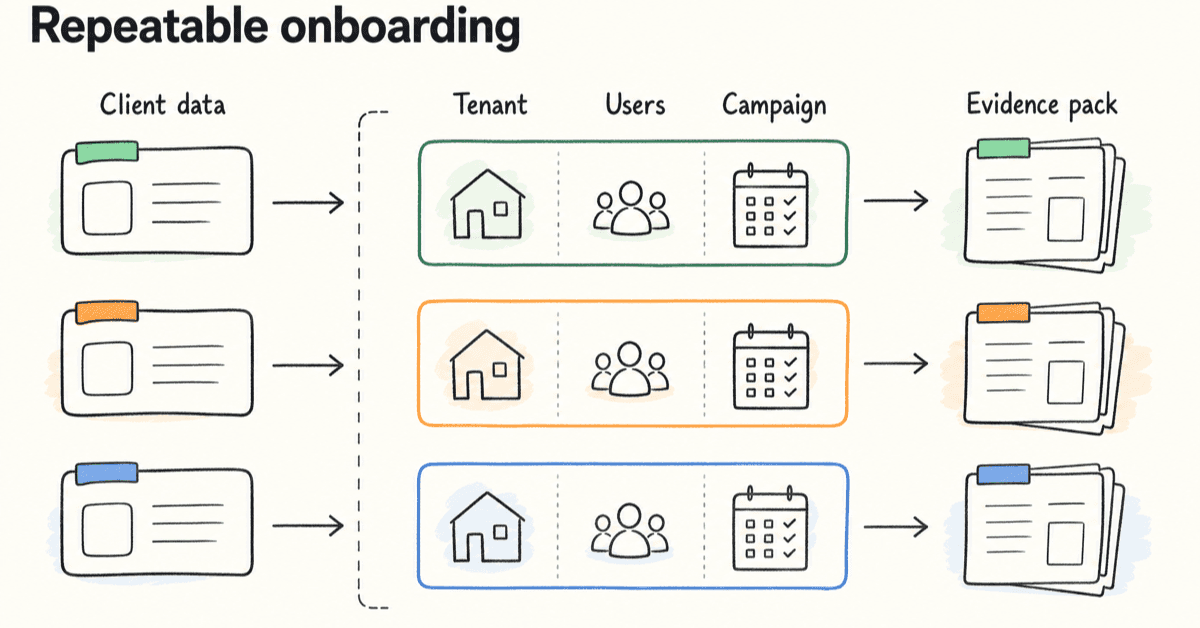
For an MSP, onboarding means turning security awareness training into a repeatable service line: tenant setup, user scope, branding, campaign launch, reminders, reporting, and evidence all running from one operating model.
The platform matters, but the runbook matters just as much. If every new client needs a custom setup, a custom reminder process, and a custom report build, the MSP has not onboarded a client. It has accepted another admin queue.
A good multi-tenant onboarding process keeps client data separated, makes the first campaign easy to launch, gives the client usable proof, and leaves the MSP with a workflow it can repeat for client 2, 20, and 200.
What multi-tenant SAT onboarding means
A multi-tenant SAT platform lets an MSP manage separate client environments from a shared operating layer.
That matters because an MSP is not running security awareness training for 1 internal workforce. It is running training across many client workforces, each with its own users, managers, brand expectations, compliance language, and reporting cadence.
Client onboarding is the handoff from sold service to working service.
For SAT, that handoff usually includes:
- creating or activating the client tenant
- applying the right client branding
- confirming who is in scope
- importing or syncing users
- setting admin permissions
- assigning the first campaign
- configuring reminders
- checking reports and exports
- giving the client a first proof pack
- setting the ongoing cadence
That is the clean version.
The messy version starts when those steps are not standardized.
One client sends a spreadsheet. Another wants Microsoft 365 sync. Another has 4 departments and a cyber insurance deadline next week. Another wants training under the MSP's brand. Another needs a board-ready report by Friday.
The work looks like training admin. It is really service delivery design.
NIST SP 800-50 Rev. 1 frames cybersecurity and privacy learning as a managed life-cycle program with role-based needs, behavior change, metrics, and regular improvement in Building a Cybersecurity and Privacy Learning Program. That is a useful lens for MSPs. A training program is not only content assignment. It is an operating loop.
Multi-tenant onboarding is the point where the MSP decides whether that loop will be controlled or improvised.
Why client onboarding breaks in single-client SAT workflows
Most SAT tools can run a course.
That is not the same as running SAT as an MSP service.
A single-client workflow can survive a little manual work. An MSP workflow cannot. A 10-minute exception becomes 5 hours when it repeats across 30 clients.
The failure usually shows up in 5 places.
User scope keeps changing
Users join. Users leave. Managers move. Departments change. Contractors come and go.
If the SAT platform depends on manual user updates, the MSP inherits every client HR change as a training task.
Microsoft's Entra provisioning documentation for KnowBe4 shows why user lifecycle matters. Automatic provisioning can create users, remove users when access is no longer needed, synchronize attributes, provision groups, and monitor provisioning logs in Configure KnowBe4 Security Awareness Training for automatic user provisioning with Microsoft Entra ID.
The vendor in that example is less important than the pattern. User onboarding is not a one-time import. It is a lifecycle.
Reporting becomes client-by-client cleanup
A client rarely asks, "Did you send training?"
They ask:
- Who completed it?
- Who is overdue?
- What was assigned?
- When did reminders go out?
- Can I send this to an insurer?
- Can I show this during an audit?
- Can this carry our brand?
If those answers require portal switching, spreadsheet cleanup, screenshots, or manual PDF work, reporting becomes the hidden cost of the service.
Branding becomes a delivery bottleneck
White-label matters because MSPs sell trust under their own name.
But branding can create admin drag if every client needs custom email copy, custom report formatting, custom sender details, and custom portal notes before the first campaign can launch.
The goal is not to make every client look identical. It is to make branding repeatable.
Compliance language arrives late
Clients do not always say "we need awareness training" in the same words.
One asks for ISO/IEC 27001 evidence. One asks for NIST CSF alignment. One asks for cyber insurance proof. One asks for Essential Eight support. One only knows the auditor asked for proof that staff were trained.
If the MSP waits until the report request arrives, it has to rebuild evidence after the fact.
Per-client portals hide fleet risk
A client portal can look fine in isolation.
The MSP problem is the fleet view.
Which clients have launched? Which are overdue? Which have not synced users? Which reports are ready for QBR? Which tenant has a broken reminder path?
MSP-focused vendors know this. Hook Security positions its MSP page around multi-tenant management, global campaign deployment, auto-sync users, consolidated reporting, and white-label reports in Security Awareness for MSPs. Wizer says its MSP platform is multi-tenant and designed for MSPs managing multiple clients, with onboarding, management, reporting, and customer-volume needs in Wizer's MSP security awareness page. Phin's MSP comparison guide lists true multi-tenant management, integrations, automated campaign management, white labelling, and reporting as MSP-friendly criteria in Top Cybersecurity Awareness Training Providers for MSPs.
They do not all solve the problem the same way. But the market signal is clear: MSP onboarding is a multi-client operations problem.
What MSPs need before the first client is added
Do not start by clicking "add client."
Start by locking the service shape.
A multi-tenant SAT onboarding runbook needs enough detail that a service coordinator, vCISO, or tech lead can repeat it without asking the owner 12 questions.
| Onboarding item | MSP decision to lock | Evidence or output | Why it matters |
|---|---|---|---|
| Client scope | Which users, groups, locations, and roles are included | Approved user source or sync scope | Prevents over-training, under-training, and billing confusion |
| Tenant setup | Client name, tenant owner, timezone, sender details, brand settings | Tenant checklist | Keeps client environments separated and recognizable |
| Access model | Who has MSP admin access, client admin access, and report-only access | Permission record | Reduces accidental data exposure and support confusion |
| First campaign | Baseline topics, launch date, deadline, reminder cadence | Campaign plan | Stops onboarding from turning into content browsing |
| Directory or import path | Manual CSV, directory sync, group mapping, or staged import | Import/sync test result | Reduces lifecycle admin and catches bad mappings early |
| Reporting recipients | Who receives progress, overdue, QBR, and evidence reports | Report recipient list | Prevents last-minute report chasing |
| Evidence needs | NIST, ISO/IEC 27001, CIS, cyber insurance, Essential Eight, or client policy language | Evidence map | Makes proof part of the setup, not a cleanup job |
| Handoff point | What counts as onboarded | Go-live note plus first report | Gives the client and MSP a clear finish line |
ManageEngine's MSP onboarding guide says onboarding covers everything from being hired to services going live, and estimates MSPs can spend 40 to 80 hours manually entering information from existing systems and databases to onboard every client in Best practices for MSP client onboarding. Treat that as a vendor estimate, not a universal number. The useful point is the same: manual data entry is where onboarding gets expensive.
JumpCloud breaks MSP onboarding into information gathering, stakeholder updates, deployment, and the ongoing relationship in The Client Onboarding Guide for MSPs. That sequence fits SAT onboarding well. You need the data, the stakeholders, the technical launch, and the ongoing reporting cadence.
How to onboard clients to a multi-tenant SAT platform
Use this as the working runbook.
Adjust it to your service stack, but keep the order. Skipping early decisions creates late tickets.
1. Define the SAT service promise before setup
Before the tenant exists, decide what you are selling.
Is SAT included in every managed service package? Is it a paid add-on? Is it only for clients with compliance or cyber insurance pressure? Does every client get the same baseline campaign? Who owns follow-up when users are overdue?
This is not a marketing question only. It changes onboarding.
A bundled service needs low-admin defaults. A paid add-on may allow more client-specific configuration. A compliance-led rollout needs evidence mapping from day 1.
Write the service promise in plain language:
- who is covered
- how often training runs
- what the client receives
- who chases completion
- what proof is included
- what is out of scope
If the team cannot explain that in 60 seconds, do not start the setup.
2. Create the client tenant and apply the naming rules
The tenant is the control boundary.
Use a consistent naming pattern for client tenants, groups, campaigns, reports, and exports. This sounds small until someone has to find proof across 80 clients 9 months later.
At minimum, standardize:
- legal client name
- display name
- tenant owner
- timezone
- reporting month or quarter
- primary contact
- technical contact
- compliance contact, if different
- brand settings
- default sender details, if supported and approved
Keep tenant separation clean. Do not blend client reports. Do not reuse one client group as a template if it carries client-specific settings. Do not let a shortcut create evidence confusion later.
For Defendwise readers, this is where multi-tenancy should prove its value: one MSP operating layer, separate client environments, and less client-by-client portal switching.
3. Confirm users, groups, and exceptions
The first user import is where many SAT rollouts quietly go wrong.
The MSP should know:
- who is in scope
- who is out of scope
- whether contractors are included
- whether executives need different training
- whether privileged users need role-based content
- which departments or groups matter
- who approves changes to the list
Do not import a client-wide user list and hope it is correct.
If using directory sync, start small. Microsoft recommends testing with a small set of users and groups before broader rollout in its Entra provisioning guide for KnowBe4. That advice applies to any SAT sync path. Prove the mapping before you point the system at the whole client.
If using CSV, standardize the import fields. Keep the source file, import date, and owner. Bad CSV hygiene is still bad lifecycle hygiene.
4. Map the first campaign to real client risk
The first campaign should not be a tour of the content library.
It should answer the client’s immediate risk and proof needs.
A sensible first campaign often covers:
- phishing recognition and reporting
- password and password manager basics
- MFA expectations
- software update behavior
- suspicious attachment handling
- data handling basics
- role-specific topics for finance, leadership, or admins
CISA's Secure Our World program uses a simple set of user behaviors: recognize and report phishing, use strong passwords, turn on MFA, and update software in Secure Our World. Those topics are not exotic. They are the basics clients expect users to know.
Verizon's DBIR page says frequent breach causes continue to involve the human element, including social engineering, phishing, stolen credentials, and software vulnerabilities in Data Breach Investigations Report. That does not mean training solves every breach. It means the first campaign should connect to the behaviors that keep appearing in real incidents.
5. Set the reminder and escalation path before launch
Reminders are where SAT admin multiplies.
Decide before launch:
- when the first reminder goes out
- how many reminders are sent
- who sees overdue users
- whether managers receive escalation reports
- whether the MSP or client chases completion
- what happens after the deadline
- what language the reminder uses
If the platform can automate reminders, use that for the repeatable path. If a human has to step in, define the trigger.
The goal is not to nag users forever. The goal is to avoid a service coordinator manually checking every tenant every week.
Link this step to automated reporting and client expectations. If reports show overdue users clearly, managers can act without asking the MSP for a new spreadsheet.
6. Test the report before the client asks for it
Every onboarding process should include a report test.
Not after the first quarter. Before handoff.
Check that the report can show:
- users in scope
- campaign assigned
- completion status
- overdue status
- launch date and due date
- reminder activity, where available
- tenant name
- client-ready branding, where needed
- export format
- evidence notes for audit or insurance use
Do not wait until the insurer asks for proof.
ISO describes ISO/IEC 27001 as the best-known standard for information security management systems, covering people, policies, and technology in ISO/IEC 27001:2022. ISO's public page does not give you every audit detail for free, but it does make the broader point: information security is managed through a system, not a pile of screenshots.
If a client is using ISO/IEC 27001 language, the MSP should avoid promising certification outcomes from SAT. The safer claim is that SAT reports can support awareness evidence when they show scope, assignment, completion, dates, and training topics.
7. Close onboarding with a client handoff
The onboarding finish line is not "campaign launched."
The finish line is the client understands what is running, what they receive, and what happens next.
Send a short handoff note with:
- campaign name
- target audience
- launch date
- due date
- reminder schedule
- report cadence
- contact for questions
- first evidence export or sample report
- next QBR or review point
JumpCloud's MSP onboarding guide stresses the ongoing relationship, including regular executive summaries and QBRs. SAT should fit that motion. The first report should make the MSP look organized, not make the client wonder what changed.
What good looks like after 30 days
A good onboarding process produces evidence that the workflow is working.
Look for these signals after the first 30 days:
| Signal | Good sign | Warning sign |
|---|---|---|
| User scope | New starters and leavers are handled without manual scrambling | The MSP keeps finding stale or missing users |
| Campaign launch | The first campaign launched with approved audience and deadline | Launch waited on unclear owner, copy, or report settings |
| Reminder flow | Reminders ran on schedule and overdue users are visible | A coordinator had to manually chase users across tenants |
| Client reporting | Client received a clear progress or completion report | The report needed spreadsheet cleanup before sending |
| Evidence export | Assignment, completion, and dates are exportable | Evidence exists only as screenshots or portal views |
| Tenant hygiene | Client data and reports stay separated | Exports or naming create client confusion |
| Service handoff | Client knows cadence and next report date | Client asks basic status questions the report should answer |
The strongest sign is boring repetition.
The second client should not feel like a fresh implementation. The fifth client should feel lighter than the first. By the tenth, the MSP should know where onboarding usually fails and have a control for it.
That is the point of multi-tenant SAT onboarding.
Not flash. Repeatability.
Compliance and evidence mapping for SAT onboarding
Security awareness training touches multiple frameworks, but it does not certify a client by itself.
Keep the claim modest and useful: SAT can help produce evidence for awareness, training, and user-behavior expectations when the program is scoped, assigned, tracked, and reported clearly.
NIST CSF
NIST CSF 2.0 PR.AT-01 says personnel are provided awareness and training so they can perform general tasks with cybersecurity risks in mind. The CSF Tools reference lists implementation examples such as training users to recognize social engineering attempts, report suspicious activity, comply with acceptable-use policies, perform basic cyber hygiene, and receive annual refreshers in PR.AT-01.
For onboarding, that means the MSP should capture:
- who was trained
- what topics were assigned
- when the training happened
- whether refreshers are scheduled
- whether reporting suspicious activity is covered
CIS Control 14
CIS Control 14 focuses on establishing and maintaining a security awareness program to influence workforce behavior and reduce cybersecurity risk in CIS Critical Security Control 14.
For onboarding, that means the MSP should avoid one-off course sends. The first client setup should point to a maintained program: topics, cadence, completion, refreshers, and reporting.
ISO/IEC 27001
ISO/IEC 27001 is an information security management system standard. ISO's public summary says it helps organizations manage risks through people, policies, and technology.
For onboarding, do not claim "ISO compliance" because a client completed a training campaign. Instead, create evidence that supports the awareness part of the client's ISMS:
- assigned training topics
- user scope
- completion status
- dates
- report export
- owner and review cadence
Essential Eight
The Australian Signals Directorate describes the Essential Eight as a baseline set of mitigation strategies that makes it much harder for adversaries to compromise systems in Essential Eight.
The Essential Eight is not a SAT framework. But MSPs serving Australian clients may still need awareness evidence around behaviors that support the technical controls, such as reporting suspicious activity, update behavior, and MFA use.
Keep the mapping honest. Training can support behavior and evidence. It does not replace technical implementation.
Cyber insurance
Cyber insurance questionnaires vary.
Do not guess what an insurer will accept. Build onboarding so the MSP can answer common proof questions quickly:
- Do users receive security awareness training?
- Is phishing covered?
- Is training recurring?
- Can completion be shown?
- Are overdue users visible?
- Can reports be exported?
The safest evidence pack is factual. It says what happened, who it applied to, when it happened, and where the proof came from.
Mistakes to avoid when onboarding clients to multi-tenant SAT
Starting with content instead of workflow
Content matters.
But content is not the first onboarding problem for MSPs.
If the workflow is weak, a better module only gives you a better module inside a bad operating model. Start with tenant, users, campaign, reminder, report, evidence, and handoff.
Then pick content.
Treating directory sync as magic
Sync can reduce admin. It can also import the wrong people at speed.
Test with a small group. Confirm attributes. Confirm groups. Confirm deprovisioning. Monitor logs. Decide who owns exceptions.
Automation without ownership is just faster confusion.
Letting every client invent the cadence
Some clients need a specific cadence for contract, insurer, or audit reasons.
But if every client invents a training rhythm from scratch, the MSP loses the benefit of a repeatable service.
Create defaults. Allow exceptions. Track the exceptions.
Sending reports the client cannot use
A dashboard view is not always client-ready evidence.
Clients may need a PDF, CSV, QBR slide, or audit pack. They may need language that a non-technical manager understands.
If the report cannot leave the platform without cleanup, the MSP still owns the admin work.
Overclaiming compliance
Training evidence can support compliance work.
It does not make a client ISO/IEC 27001 certified. It does not prove the Essential Eight is implemented. It does not guarantee an insurer accepts the answer.
Write evidence notes like an auditor may read them. Plain. Specific. Factual.
Ignoring the handoff
A client can be technically onboarded and still confused.
If they do not know what is running, who is overdue, when reports arrive, and what the MSP will do next, they will ask. Those questions become tickets.
Close the loop with a short handoff note and a first report.
How Defendwise fits
MSPs do not need another SAT tool that works fine for 1 client and gets messy at 30.
They need a training operating layer that protects margin as the client base grows.
Defendwise is built for MSPs that want flat-rate pricing, unlimited users, white-label delivery, multi-tenant management, automated onboarding, and client-ready reporting.
The test is simple: can you add a client, get users in, launch the first campaign, chase completion, and export useful proof without creating a new admin queue?
If that is the pain, start a free 7-day trial and run the onboarding test on one client.
Frequently Asked Questions
How do you onboard clients to a multi-tenant SAT platform?
Start with a standard MSP onboarding runbook: confirm scope, create the tenant, set branding and admin access, import or sync users, assign the first training campaign, configure reminders, test reporting, and export a first evidence pack.
The key is to make every client follow the same operating path while keeping tenant data, branding, and reports separate.
What should MSPs collect before onboarding a client to SAT?
Collect the client name, primary contacts, user list or directory source, departments or groups, required branding, compliance or insurance deadlines, reporting recipients, admin permissions, campaign cadence, and any users who need role-based training.
Do not start campaigns until the scope and owner for each step are clear.
Why does multi-tenant SAT matter for MSP onboarding?
Multi-tenant SAT lets an MSP manage many client environments from one operating layer while keeping each client separated.
That reduces portal switching, repeated setup work, blended evidence, and one-off reporting cleanup across the client base.
Should MSPs use directory sync when onboarding SAT clients?
Use directory sync where the client environment and platform support it, but test with a small group first.
Directory sync can reduce manual user creation and removal, but poor scoping or mapping can create the wrong audience, duplicate users, or noisy exceptions.
What is the first campaign to launch after SAT onboarding?
The first campaign should be a baseline awareness campaign tied to the client’s real risks, not the largest content library available.
For most MSPs, that means phishing, password hygiene, MFA, reporting suspicious activity, and any compliance or cyber insurance topic the client already cares about.
What reports should be ready after onboarding a SAT client?
At minimum, prepare a client-ready report showing users in scope, assigned training, completion status, overdue users, reminder history, campaign dates, and exportable evidence.
If the client has audit or insurance pressure, map the report to the framework or questionnaire language they need.
How long should SAT client onboarding take?
The calendar time depends on the client’s identity source, user count, branding, approval process, and reporting needs.
The better question is whether the MSP can repeat the same setup path without rebuilding the workflow for every client.
How does Defendwise help MSPs onboard clients to SAT?
Defendwise is built for MSPs that want flat-rate security awareness training, unlimited users, white-label delivery, multi-tenant management, automated onboarding, and client-ready reporting.
A good trial should prove whether onboarding, reminders, reporting, and evidence can run without creating another ticket queue.
Source notes
External sources used for claim support:
- NIST SP 800-50 Rev. 1, Building a Cybersecurity and Privacy Learning Program: https://csrc.nist.gov/pubs/sp/800/50/r1/final
- NIST CSF PR.AT-01 reference via CSF Tools: https://csf.tools/reference/nist-cybersecurity-framework/v2-0/pr/pr-at/pr-at-01/
- CIS Critical Security Control 14, Security Awareness and Skills Training: https://www.cisecurity.org/controls/security-awareness-and-skills-training
- ISO/IEC 27001:2022 overview: https://www.iso.org/standard/27001
- ASD Essential Eight overview: https://www.cyber.gov.au/business-government/asds-cyber-security-frameworks/essential-eight
- CISA Secure Our World: https://www.cisa.gov/secure-our-world
- Verizon Data Breach Investigations Report page: https://www.verizon.com/business/resources/reports/dbir/
- ManageEngine MSP onboarding checklist: https://www.manageengine.com/products/service-desk-msp/msp-onboarding-checklist.html
- JumpCloud client onboarding guide for MSPs: https://jumpcloud.com/resources/the-client-onboarding-guide-for-msps
- Microsoft Entra provisioning guide for KnowBe4 Security Awareness Training: https://learn.microsoft.com/en-us/entra/identity/saas-apps/knowbe4-security-awareness-training-provisioning-tutorial
- Hook Security MSP page: https://www.hooksecurity.co/for-msps
- Wizer MSP page: https://www.wizer-training.com/cybersecurity-awareness-training-phishing-for-msp
- Phin Security MSP-friendly SAT comparison guide: https://www.phinsecurity.com/blog/top-cybersecurity-awareness-training-providers-for-msps-and-what-makes-a-platform-actually-msp-friendly
Internal Defendwise links used: