How to build branded training portals for clients
How to build branded training portals for clients with tenant separation, SSO, reporting, evidence, and repeatable MSP workflows.
Defendwise
DefendWise
TL;DR
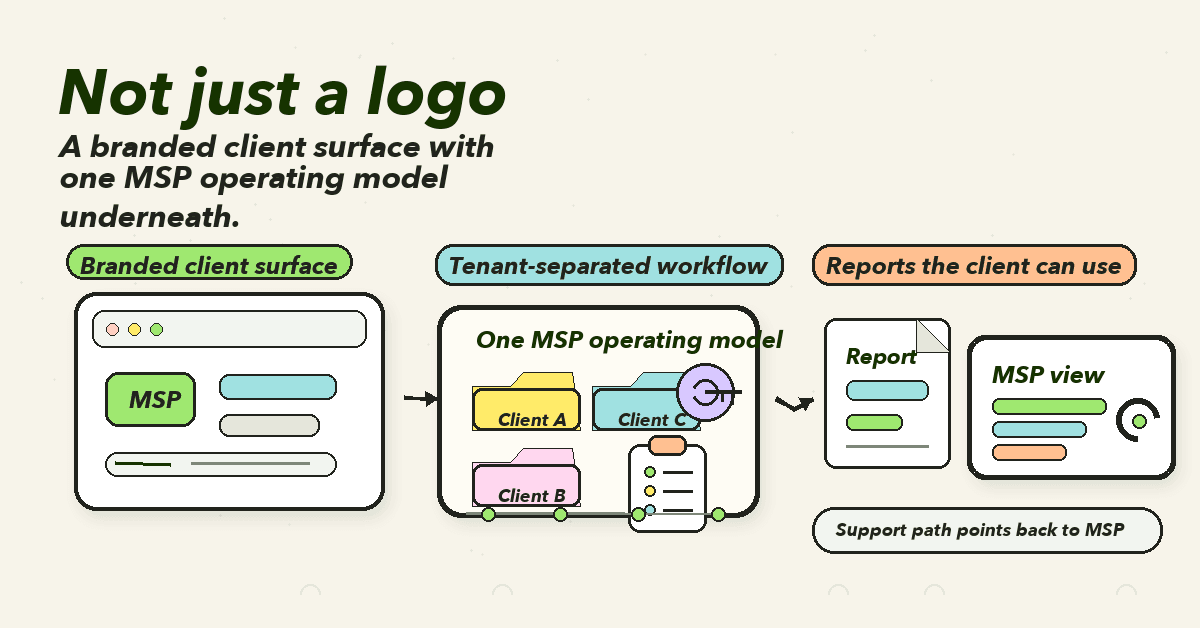
A branded training portal is not just a login page with your logo.
For MSPs, the useful version is a repeatable client operating layer: each client gets its own branded training experience, tenant-separated users, safe access, automated enrollment, reminders, reports, evidence exports, and a support path that points back to the MSP.
That matters because training is only valuable at scale if clients trust the experience and the MSP can run it without rebuilding the workflow for every tenant.
The goal is simple. Your client should see your brand. Your team should see one clean operating model.
What a branded training portal actually is
A branded training portal is the client-facing place where users log in, complete assigned training, receive reminders, and where managers or client stakeholders can see progress and evidence.
For an MSP, it has 2 jobs.
First, it keeps the MSP visible. The client does not feel like they have been handed off to a third-party vendor the moment training begins.
Second, it turns training into a managed service workflow. The portal should help the MSP onboard clients, manage users, assign campaigns, track completion, export evidence, and support account changes across the client book.
That second job is where weak portals fall over.
A logo and color picker can make a page look owned. They do not answer harder questions:
- Is each client separated from every other client?
- Can the MSP manage all clients without logging in and out of different accounts?
- Can a client manager see only their own users?
- Can new hires be enrolled without manual chasing?
- Can reports be exported for QBRs, cyber insurance, or ISO 27001 evidence?
- Can the support path be clear when a user cannot log in?
- Can the portal still feel like the MSP's service when the training engine sits behind the scenes?
That is the standard MSPs should use.
The portal is not a decoration layer. It is the client surface of the service.
Why branded training portals matter for MSPs
MSPs sell trust before they sell tooling.
When a client buys security awareness training through an MSP, the client is usually not asking for another vendor relationship. They are asking the MSP to take responsibility for a human-risk problem that keeps showing up in phishing, business email compromise, compliance requests, and cyber insurance forms.
The source evidence supports the need for a real program, not a once-a-year checkbox.
NIST SP 800-50 Rev. 1 frames cybersecurity and privacy learning as a life-cycle program, with metrics and regular updates as needs evolve. CIS Control 14 says organizations should establish and maintain a security awareness program to influence workforce behavior and reduce cybersecurity risk.
For clients, that program needs to be visible enough to believe.
For MSPs, it needs to be operational enough to scale.
A branded portal helps when it does 4 things well:
- Keeps the MSP as the authority. The client sees the MSP's brand on the training experience, reports, and support flow.
- Reduces client confusion. Users know where to go, what to complete, and who owns the service.
- Creates evidence. Client managers and auditors can see assignments, completion, dates, topic coverage, and reports.
- Protects MSP margin. The same workflow can be repeated across 10, 50, or 100 clients without a custom build each time.
The commercial point is plain.
If every new client portal creates another manual admin lane, the MSP has not built a service. It has built a prettier support queue.
The portal stack MSPs actually need
A useful portal has layers. Branding is one of them. It is not the whole system.
| Portal layer | What the client sees | What the MSP needs behind it | Why it matters |
|---|---|---|---|
| Brand layer | MSP logo, domain or subdomain, email identity, report branding | Reusable brand settings, client-level overrides, consistent templates | Keeps the MSP visible and reduces vendor handoff feel |
| Tenant layer | Their users, training, reports, and evidence only | Strong tenant context, client boundaries, admin scope | Prevents cross-client confusion and data exposure |
| Identity layer | Login, SSO, MFA where practical, password reset support | Role-based access, lifecycle sync, admin controls | Reduces friction and protects accounts |
| Campaign layer | Assigned modules, reminders, due dates, completion status | Templates, automation, role-aware assignment | Makes training repeatable without custom admin per client |
| Reporting layer | Manager views, completion summaries, risk notes, PDF exports | Per-client data, date ranges, exportable evidence | Turns training into a QBR and audit conversation |
| Support layer | Clear help path for login or assignment issues | MSP-owned escalation, audit trail, admin visibility | Stops portal friction becoming hidden client frustration |
This is where MSP-specific design matters.
A single-company training portal can optimize for one brand, one admin team, and one employee base.
An MSP training portal has to serve many clients without mixing them together. It has to make the client experience feel local while giving the MSP a fleet-wide view.
That is a different product problem.
Step 1: Start with the client-facing workflow
Do not start with the logo.
Start with the path a normal user will follow:
- They receive a branded invitation or reminder.
- They understand why they are being asked to complete training.
- They log in without opening a support ticket.
- They see only the training assigned to them.
- They finish the module.
- Their manager or admin can see completion.
- The MSP can report the result later.
Then map the manager path:
- The manager can see their client only.
- They can check completion and overdue users.
- They can export or receive a clean report.
- They know where to send staff questions.
- They can raise exceptions without emailing screenshots around.
Finally, map the MSP admin path:
- Create or clone client setup.
- Apply branding.
- Add or sync users.
- Assign campaigns.
- Set reminders.
- Review progress.
- Export reports.
- repeat for the next client.
If the admin path is longer than the client path, the economics will bite.
The goal is not a beautiful portal in isolation. The goal is a repeatable service workflow under your brand.
Step 2: Decide what "branded" means before you build
Branding can be shallow or useful.
The shallow version is a logo in the top left.
The useful version covers the touchpoints that make the client feel the MSP owns the service:
- Portal logo.
- Portal colors.
- Login or landing experience.
- Email sender identity where available.
- Email templates.
- Client-facing report branding.
- PDF report header and footer.
- Support contact.
- Domain or subdomain strategy.
- Client-specific naming where needed.
- Plain-language explanation of the service.
Microsoft's Entra documentation is a useful reminder that even sign-in branding has limits and prerequisites. Its company branding guidance explains that branding can cover elements such as background, logo, layout, header, footer, and CSS, but also notes license and role requirements.
The lesson for MSPs is not "copy Microsoft Entra branding."
The lesson is that branding has to be governed.
Decide:
- Who owns default MSP branding?
- Which client-specific changes are allowed?
- Who approves logo changes?
- Are custom domains required or optional?
- What happens when a client rebrands?
- What support language appears in the portal?
- Which email identity sends training reminders?
- What must never be client-editable?
Without those rules, "white-label" becomes a pile of one-off exceptions.
Step 3: Treat tenant separation as a core requirement
A branded training portal for MSPs is usually multi-tenant.
That means multiple clients are served from a shared platform, shared codebase, or shared admin model. Done well, this is what makes MSP scale possible. Done badly, it creates the exact kind of cross-client risk the MSP cannot afford.
OWASP's Multi-Tenant Application Security Cheat Sheet is blunt about the risk. Multi-tenant applications can create cross-tenant data leakage, tenant impersonation, broken tenant isolation, insecure direct object references, privilege escalation across tenants, and audit gaps.
That should shape the portal requirements.
For a branded training portal, tenant separation should cover:
- Users.
- Groups.
- Campaigns.
- Training assignments.
- Completion data.
- Reports.
- Evidence exports.
- Admin roles.
- Branding settings.
- Support notes.
- Integration settings.
- Audit logs.
OWASP also recommends establishing tenant context early, binding tenant context to the authenticated user session, and not trusting client-supplied tenant IDs without validation.
For MSPs, the practical test is simple:
Can a client admin, manager, or learner ever see another client's users, reports, training assignments, or evidence?
If the answer is anything other than no, the portal is not ready.
Step 4: Design access around roles, not vibes
Authentication answers "who are you?"
Authorization answers "what are you allowed to do?"
MSPs need both.
OWASP's Authorization Cheat Sheet makes the distinction clear. A user who has authenticated is not automatically allowed to access every resource or perform every action in the system. OWASP's Broken Access Control guidance also warns that access control failures can lead to unauthorized disclosure, modification, or destruction of data.
That matters in training portals because roles multiply quickly:
| Role | Should see | Should not see |
|---|---|---|
| Learner | Own assignments, status, certificates where used | Other users, client reports, admin settings |
| Client manager | Their client users, completion, overdue users, reports | Other client tenants, MSP-wide settings |
| Client admin | Client-level setup, users, reports, support requests | Other clients, global MSP settings |
| MSP admin | All assigned client tenants, campaign templates, reports | Platform provider internals not relevant to delivery |
| MSP support | Login/support details needed to resolve tickets | Unnecessary training content edits or client financial data |
This is where SSO and MFA belong in the design discussion.
NIST's current SP 800-63B digital identity guidance explains authentication assurance levels and the role of authenticators in proving control of a digital identity. Microsoft also documents how Conditional Access and cross-tenant settings can affect external-user access to resources.
An MSP does not need to turn every small-client portal into an enterprise IAM project.
But the portal should be clear on:
- Which roles need MFA.
- Whether SSO is available.
- Whether Microsoft 365 sync is supported.
- How admin invites are controlled.
- How leavers are removed.
- How stale accounts are reviewed.
- How support resets are approved.
- What gets logged when access changes.
A branded portal that lets the wrong person see the wrong client data is worse than an unbranded portal.
Step 5: Build user lifecycle into the portal workflow
Training portal admin usually fails in the quiet places.
A client hires 6 people. No one adds them.
A leaver stays active. No one notices.
A department changes. The wrong training keeps going out.
A manager asks for completion evidence. The report is 3 exports and a spreadsheet.
These are not copy problems. They are lifecycle problems.
A good branded training portal should help the MSP answer:
- How are users added?
- Can users self-enroll?
- Can users sync from Microsoft 365 or another directory?
- Can users be imported by CSV?
- Can groups or roles drive training assignment?
- What happens when someone leaves?
- Can reminders run without manual chasing?
- Can overdue users be surfaced by client?
- Can the MSP see which clients have stale data?
- Can reports show the right date range and tenant?
This is why reduced admin is not a soft benefit.
For MSPs, admin time is the margin leak.
If branded portals require manual user edits, manual reminders, manual report exports, and manual evidence cleanup, the white-label promise gets expensive fast.
A portal should make the branded client experience feel polished while keeping the back-end workflow boring, repeatable, and fast.
Step 6: Map portal evidence to compliance conversations
Clients rarely ask for training evidence because they enjoy training evidence.
They ask because something else is happening:
- ISO 27001 audit.
- Cyber insurance renewal.
- Customer security questionnaire.
- Board or owner reporting.
- QBR.
- Incident follow-up.
- Internal policy review.
ISO/IEC 27001 defines requirements for an information security management system and a risk-management approach to information security. NIST CSF 2.0 helps organizations understand and improve cybersecurity-risk management. CIS Control 14 gives a clear control lens for security awareness and skills training.
A branded training portal should not pretend training evidence proves every security control.
It should prove the training activity it actually supports.
Useful evidence includes:
- Client name or tenant.
- Training assignment.
- Topic or module.
- User list.
- Assigned date.
- Completion date.
- Overdue status.
- Reminder history.
- Campaign status.
- Report generation date.
- Export owner.
- Manager view or summary.
- Exceptions and follow-up notes.
The MSP should be able to hand a client a report that says, in plain language:
Here is what was assigned. Here is who completed it. Here is what is overdue. Here is what we are doing next.
That is much stronger than "we have a portal."
Step 7: Make the portal supportable
A portal is part of the client experience, so support must be designed before launch.
At minimum, decide:
- Who receives login questions?
- Who handles SSO or MFA issues?
- Who can resend an invite?
- Who can correct a user email?
- Who can change a manager role?
- Who can export evidence?
- What response time applies?
- Which issues go to the platform vendor?
- What does the client see while a support request is open?
This is where some white-label setups get awkward.
If the user clicks "help" and lands in a vendor-branded support queue, the MSP looks like a reseller.
If the MSP hides the vendor but cannot resolve basic portal issues, the client waits while the MSP plays ticket relay.
The better model is clear ownership:
- Routine user and manager support points to the MSP.
- Platform-level defects or account issues can be escalated behind the scenes.
- Client-facing language stays clean.
- Support activity leaves enough trail for review later.
A branded portal should not just look like the MSP. It should behave like the MSP can stand behind it.
What good looks like
A strong branded training portal for MSPs has a few visible signs.
The client sees one consistent service
The invitation, portal, training reminder, support path, and report all feel connected.
No sudden vendor handoff. No mystery login page. No confusing "who owns this?" moment.
The MSP sees one fleet-wide operating model
Client-specific branding exists, but the operational workflow stays standard.
New clients do not require a custom portal project. New users do not require a manual checklist. Reports do not require screenshots.
Tenant boundaries are obvious
Admins, managers, and learners see only what their role and client allow.
OWASP's multi-tenant guidance is technical, but the commercial result is simple: no client should ever wonder whether their data is mixed with someone else's.
Reports are client-ready
A client report should be readable by a non-technical owner, useful to a technical manager, and clean enough to keep for audit or renewal evidence.
It should not require the MSP to explain 15 internal platform fields.
The portal helps training become part of the package
The ideal outcome is not "we sold a portal."
The ideal outcome is that security awareness training becomes a standard part of the managed service package, under the MSP's brand, with predictable cost and low admin load.
That is where flat-fee economics matter.
If the MSP pays per seat, every user and every client adds cost pressure. If the MSP can run training under a flat-fee model, branded portals become easier to include across the whole client book.
Common mistakes to avoid
Mistake 1: Calling it white-label when only the login screen is branded
Clients notice the whole experience.
If the portal is branded but the emails, reports, support path, and exports all point somewhere else, the MSP still looks like a pass-through.
Mistake 2: Letting every client become a custom project
Custom work feels good for the first client and painful by the tenth.
Use templates. Define defaults. Limit exceptions. Keep branding flexible enough to feel owned, but not so flexible that every rollout becomes a rebuild.
Mistake 3: Ignoring manager access
Learners need training. Managers need visibility.
If the portal does not give client managers a clean view of completion, overdue users, and reports, the MSP becomes the reporting interface by hand.
That does not scale.
Mistake 4: Treating reports as screenshots
Screenshots are weak evidence.
A useful report has tenant, date range, assignments, completion, overdue users, topic coverage, and exportable proof. It should help the client answer the next audit, insurance, or QBR question.
Mistake 5: Forgetting support until users complain
Every branded portal creates a support expectation.
If login help, invite resends, SSO questions, and manager permissions are not designed, the portal will create friction at the exact moment it is meant to build trust.
Mistake 6: Building around the vendor instead of the MSP
The client bought from the MSP.
The portal should make the MSP look like the security authority, not the person who forwarded a vendor login.
Where Defendwise fits
Defendwise is built for MSPs that want security awareness training under their own brand, across many clients, without the per-seat pricing model making every rollout harder to justify.
The fit is strongest when the MSP wants a white-label, multi-tenant training workflow with automated onboarding, integrations, and client-ready reporting.
That is the point of the portal: every client sees the MSP's service, while the MSP runs one repeatable operating model behind it.
You can start a free 7-day trial and test whether the branded portal workflow fits your client book before you roll it into a package.
Frequently asked questions
How do MSPs build branded training portals for clients?
Start by mapping the user, manager, and MSP admin workflows. Then define branding, tenant separation, access roles, user lifecycle, training assignments, reminders, reporting, evidence exports, and support ownership. The portal should feel branded to the client and repeatable to the MSP.
What should a branded training portal include?
It should include MSP branding, per-client tenants, learner and manager roles, SSO or MFA where practical, automated enrollment options, campaign templates, reminders, progress tracking, reports, evidence exports, and a support path that points back to the MSP.
Is white-label branding enough for client training portals?
No. Branding matters because it keeps the MSP visible, but it does not solve the operating problem by itself. The portal also needs tenant boundaries, access control, reporting, evidence, user lifecycle controls, and repeatable admin workflows.
Why does tenant separation matter in a branded training portal?
MSPs manage many clients. Each client needs its own users, training history, reports, settings, and evidence. Weak tenant separation can create cross-client data exposure, confusion, and audit gaps.
Should branded training portals support SSO and MFA?
Yes, where practical. SSO can reduce login friction, and MFA can protect admin and manager access. The exact setup should fit the client size and risk, but portal access should not depend on unmanaged passwords alone.
How should MSPs prove portal activity to clients?
Use reports that show assigned training, completion status, overdue users, topic coverage, reminders, date ranges, and evidence exports. The evidence should be tied to the client tenant, not mixed into a vendor-wide admin view.
Can Defendwise help with branded training portals for clients?
Yes. Defendwise is a flat-fee, white-label, multi-tenant security awareness platform for MSPs. It is designed to help MSPs deliver training under their own brand with automated onboarding and client-ready reports.
Source notes
External sources checked and used:
- NIST SP 800-50 Rev. 1: https://csrc.nist.gov/pubs/sp/800/50/r1/final
- NIST Cybersecurity Framework 2.0: https://www.nist.gov/cyberframework
- NIST SP 800-63B digital identity guidance: https://pages.nist.gov/800-63-4/sp800-63b.html
- OWASP Multi-Tenant Application Security Cheat Sheet: https://cheatsheetseries.owasp.org/cheatsheets/Multi_Tenant_Security_Cheat_Sheet.html
- OWASP Authorization Cheat Sheet: https://cheatsheetseries.owasp.org/cheatsheets/Authorization_Cheat_Sheet.html
- OWASP Broken Access Control: https://owasp.org/Top10/A01_2021-Broken_Access_Control/
- CISA Avoiding Social Engineering and Phishing Attacks: https://www.cisa.gov/news-events/news/avoiding-social-engineering-and-phishing-attacks
- CISA Teach Employees to Avoid Phishing: https://www.cisa.gov/audiences/small-and-medium-businesses/secure-your-business/teach-employees-avoid-phishing
- Microsoft Entra company branding guidance: https://learn.microsoft.com/en-us/entra/fundamentals/how-to-customize-branding
- Microsoft Entra External ID authentication and Conditional Access: https://learn.microsoft.com/en-us/entra/external-id/authentication-conditional-access
- CIS Control 14: https://www.cisecurity.org/controls/security-awareness-and-skills-training
- ISO/IEC 27001:2022 overview: https://www.iso.org/standard/27001
- FBI IC3 2024 Internet Crime Report: https://www.ic3.gov/AnnualReport/Reports/2024_IC3Report.pdf
Internal links included: